# Table of Content

### **INTRODUCTION**

* [**About Us**](/introduction/about-us)\
  Learn about the vision, mission, and values behind Decimal.
* [**Decimal**](/introduction/about-us/decimal)\
  An overview of the Decimal platform and what it enables.
* [**Ecosystem**](/introduction/about-us/ecosystem)\
  Explore the broader ecosystem surrounding Decimal.
* [**Whitepaper**](/introduction/about-us/whitepaper)\
  Technical and conceptual foundations of the Decimal protocol.
* [**Contact Us**](/introduction/contact-us)\
  How to get in touch with the Decimal team.

***

### **TECHNICAL DOCUMENTATION**

#### **Getting Started**

* [**Setup**](#setup)\
  Initial setup and prerequisites for using Decimal.
* [**Quickstart: Your First Workflow in 5 Minutes**](/technical/quickstart-your-1st-workflow-in-5-mins)\
  Build and run your first automation workflow quickly.

***

#### **Node Directory**

* [**Manual Run**](/technical/node-directory/manual-run)
* [**Schedule Trigger**](/technical/node-directory/schedule-trigger)
* [**Webhook**](/technical/node-directory/webhook)
* [**HTTP API**](/technical/node-directory/http-api)
* [**CoinGecko price feed**](/technical/node-directory/partner-coingecko-price-feed)
* [**1Inch Bridge**](/technical/node-directory/partner-1inch-bridge)
* [**LayerZero Bridge**](/technical/node-directory/partner-layerzero-bridge)
* [**LayerZero Swap**](/technical/node-directory/partner-layerzero-swap)
* [**If-Else**](/technical/node-directory/if-else)
* [**Custom Code**](/technical/node-directory/custom-code)
* [**Set Variable**](/technical/node-directory/set-variable)
* [**Chain Connection**](/technical/node-directory/chain-connection)
* [**Sign Transaction**](/technical/node-directory/sign-transaction-eip-712)
* [**Transfer Funds**](/technical/node-directory/transfer-funds)

***

#### **Security**

* [**Security**](#security)\
  Best practices, architecture, and safeguards for secure automation.

{% columns %}
{% column width="91.66666666666666%" %}

### About Decimal

Complete overview of our identity, our values, and the bigger picture we’re working toward. Learn who we are, our vision, its mission, our partners and how to contact us.

[Intro](/introduction/about-us/decimal)  <mark style="color:$primary;">|</mark>  [Ecosystem](/introduction/about-us/ecosystem)  <mark style="color:$primary;">|</mark>  [Whitepaper](/introduction/about-us/whitepaper)  <mark style="color:$primary;">|</mark>  [Links](/introduction/contact-us)
{% endcolumn %}

{% column width="8.333333333333343%" %}

{% endcolumn %}
{% endcolumns %}

***

{% columns fullWidth="false" %}
{% column width="50%" %}

### Setup

User wallet for login & Decimal wallet for executions

[→ Must have](/technical/setup)
{% endcolumn %}

{% column width="50%" %}

### Quickstart

Your 1st workflow in 5 minutes: Hands-On experience

[→ Try it out](/technical/quickstart-your-1st-workflow-in-5-mins)
{% endcolumn %}
{% endcolumns %}

***

{% columns fullWidth="false" %}
{% column width="50%" %}

### Node Directory&#x20;

Browse through Decimal's ever-growing list of nodes.

[→ Options](/technical/node-directory)
{% endcolumn %}

{% column width="50%" %}

### Safety & Privacy

Secure, Transparent, Anon - everything verifiable

[→ Security](/technical/security)
{% endcolumn %}
{% endcolumns %}

***

[<mark style="color:orange;">In short</mark> – LFG](#user-content-fn-1)[^1]!

[^1]:


# Copy of Table of Content

This is the documentation for [decimal](https://decimal.at/), a workflow automation tool that combines Web3 capabilities with business process automation.

It covers everything from setup to usage and development. It's a work in progress and all [contributions](https://discord.gg/HW4z6Vuqz4) are welcome.

{% columns %}
{% column width="75%" %}

### About Decimal

Everything you want to know about us.

[What is it](/introduction/about-us/decimal)  <mark style="color:$primary;">|</mark>  [Vision](/introduction/about-us#our-vision-and-mission)  <mark style="color:$primary;">|</mark>  [Team](/introduction/about-us/ecosystem#team-and-advisors)  <mark style="color:$primary;">|</mark>  [Ecosystem](/introduction/about-us/ecosystem)  <mark style="color:$primary;">|</mark>  [Links](/introduction/contact-us)
{% endcolumn %}

{% column width="25%" %}

{% endcolumn %}
{% endcolumns %}

***

{% columns fullWidth="false" %}
{% column width="50%" %}

### Quickstart

Your 1st workflow in 5 minutes: Hands-On experience

[→ Try it out](/technical/quickstart-your-1st-workflow-in-5-mins)
{% endcolumn %}

{% column width="50%" %}

### Setup

User wallet for login & Decimal wallet for executions

[→ Must have](/technical/node-directory)
{% endcolumn %}
{% endcolumns %}

***

{% columns fullWidth="false" %}
{% column width="50%" %}

### Tutorials

Keep learning the way you want; at the pace you want.

[→ Learn](/technical/learning-path/tutorials-and-recipes)
{% endcolumn %}

{% column width="50%" %}

### Use Cases

Explore, learn & get inspired by others; make it yours.

[→ Ideas](/technical/learning-path/tutorials-and-recipes)
{% endcolumn %}
{% endcolumns %}

***

{% columns fullWidth="false" %}
{% column width="50%" %}

### Node Directory&#x20;

Browse through Decimal's ever-growing list of nodes.

[→ Options](/technical/node-directory)
{% endcolumn %}

{% column width="50%" %}

### Pricing

Flexible Pay-As-You-Go model. Usage based discounts.

[→ Fees](/introduction/pricing-and-usage)
{% endcolumn %}
{% endcolumns %}

***

{% columns fullWidth="false" %}
{% column width="50%" %}

### Architecture

Peek inside Decimal’s effortless workflow engine.

[→ Options](/technical/node-directory)
{% endcolumn %}

{% column width="50%" %}

### Safety & Privacy

Secure, Transparent, Anon - everything verifiable

[→ Fees](/introduction/pricing-and-usage)
{% endcolumn %}
{% endcolumns %}

***

[<mark style="color:orange;">In short</mark> – LFG](#user-content-fn-1)[^1]!

[^1]:


# About Us

Automation layer for Autonomous Web3.

> It’s the opportunity for a 40-year-old Accountant to drag two blocks together and watch his Web3 app spring to life.
>
> No waiting. No bottlenecks. Just the quiet thrill of ***“I built this.”***

***

## Blurb

### ⚡️Thesis [<sup>.</sup>](/introduction/about-us/decimal)

Decimal is the automation layer for Autonomous Web3.

As AI agents and on-chain strategies grow more complex, reliable execution becomes the bottleneck.

We turn fragmented on-chain actions into programmable workflows - coordinating users, capital, protocols, and AI agents across chains.

From trading strategies to cross-chain operations, Decimal enables deterministic execution at scale — without bots, scripts, or manual effort.

### ⚡️What Decimal enables

* **Automated strategies**: Trading, yield, and cross-chain strategies on autopilot
* **Cross-chain coordination:** Execute complex multi-step actions with 1-click
* **Agent-powered execution:** Deploy AI agents to operate per predefined logic & guardrails
* **Operational automation:** Eliminate repetitive on-chain tasks

### ⚡️Benefits

1. **From manual to automated**: Go from idea → execution in record time
2. **Trust-minimized:** Transparent, verifiable execution powered by TEEs (Trusted Execution Environments)
3. **Deterministic execution:** Define logic once, execute reliably across chains - be it across EVM, BTC, or Solana

### ⚡️Team

* 35+ years of combined experience across blockchain, AI and distributed systems
* Leadership experience across organisations such as Wipro, Infosys, Questbook, Parcel, and AirAsia
* Built enterprise-grade decentralized systems for companies including Saudi Aramco, Apple and BestBuy

### ⚡️Traction

* 800 users | 3400 workflows | 30K executions (within 2 months)
* Live product across 6 chains and 8 protocols (7+ more in pipeline)
* Supported by ecosystem players like Base, LayerZero, Marlin Foundation, Momentum6 and Symbiote
* Actively engaged in expanding partnerships and network integrations

### ⚡️Links[<sup>.</sup>](/introduction/contact-us)

* Website: [decimal.at](https://www.decimal.at)
* App: [canvas.decimal.at](https://www.canvas.decimal.at)
* Docs: [wiki.decimal.at](https://wiki.decimal.at)
* Twitter: [https://x.com/decimalat](http://x.com/decimalat)
* Calendar: <https://cal.com/abhijat/dd>

***

[<mark style="color:orange;">In short</mark> – this is just the trailer.](#user-content-fn-1)[^1]

[^1]:


# Decimal

> It’s a 2 a.m. DeFi degen is finally able to track and rebalance positions across five chains - half-asleep; without touching a terminal.
>
> It’s that rare peace when the system just ***handles it*** so you can finally log off.

***

### What is Decimal

Decimal is the execution layer for Autonomous Web3.

It enables users, capital, protocols, and AI agents to coordinate actions across chains through programmable workflows - without relying on manual transactions, fragmented tools, or custom bots.

At its core, Decimal is a visual workflow engine that lets you design, automate, and execute on-chain and off-chain operations with precision and control.

With Decimal, you can:

* **Build workflows visually**: Create complex, multi-step logic using drag-and-drop nodes
* **Coordinate across chains:** Connect wallets, dApps, APIs, and protocols in a single flow
* **Automate execution:** Run strategies, transfers, and operations continuously without manual intervention
* **Deploy agent-driven logic:** Power AI agents with predefined workflows and guardrails

Rather than interacting with individual transactions, Decimal allows you to define outcomes - and have them executed reliably across chains.

At its core, Decimal turns ideas into live, autonomous workflows - enabling programmable execution for the next generation of Web3 systems.

### Why automation matters in Web3

Web3 is powerful but fragmented — there are thousands of chains, protocols, and dApps, all with their own APIs and transaction logic.

This fragmentation slows builders down and makes even simple actions complex.

Automation matters because it:

* **Eliminates repetitive tasks** like manual bridging, rebalancing, or multisig approvals.
* **Captures** **time-sensitive opportunities** instantly when market or on-chain conditions change.
* **Brings interoperability** — connecting tools, tokens, and actions across ecosystems seamlessly.
* **Reduces dependency on developers**, allowing builders, PMs, and operators to act directly.

In short, automation bridges the gap between **Web3’s complexity** and its **potential for real-time execution**.

### Who is it for?

* **Builders & Founders** → test ideas, launch faster, grow without tech debt.
* **Communities & DAOs** → automate governance, treasury, and member engagement.
* **Product Managers** → save time by chaining APIs/dApps in minutes instead of days.
* **Operators** → run smooth back-office workflows across Web2 + Web3.

### Our Vision

> Smart contracts made assets programmable. <mark style="color:$primary;">**Decimal makes execution programmable.**</mark>

"Make execution programmable in Web3" - enabling a world where users, capital, and AI agents operate through autonomous, coordinated workflows across chains.

### Our Mission

1. **Standardise execution in Web3**

*Build the universal workflow layer that transforms fragmented on-chain actions into programmable, repeatable execution.*

2. **Enable autonomous coordination**

*Empower users, capital, and AI agents to operate seamlessly through deterministic workflows with built-in logic and guardrails.*

3. **Scale trust-minimized automation**

*Deliver reliable, verifiable execution infrastructure that allows strategies, operations, and applications to run continuously across chains.*

***

[<mark style="color:orange;">In short</mark> – it should just work.](#user-content-fn-1)[^1]

[^1]:


# Copy of Decimal

> It’s a 2 a.m. DeFi degen is finally able to track and rebalance positions across five chains - half-asleep; without touching a terminal.
>
> It’s that rare peace when the system just ***handles it*** so you can finally log off.

***

### Problem Statement

Web3 is powerful, but it’s also messy. With 1000+ chains, tokens, protocols, and tools scattered across the space, builders often spend more time stitching things together than actually creating value.&#x20;

Where timing is everything, opportunities appear & vanish in seconds. Yet most builders waste hours:

* switching between silo apps,
* navigating across multiple chains, tokens & UXs,
* or waiting for “dev help” to move an idea forward.

### Solution

We free you from those bottlenecks.

Decimal turns complex Web3 transactions and dApps into drag-and-drop “nodes”, like Lego bricks that users can snap together to create powerful, multi-chain workflows and business processes without writing code.

With our easy drag-and-drop workflows, you **build faster, keep control, and capture opportunities the moment they strike**.

### Who is it for?

* **Builders & Founders** → test ideas, launch faster, grow without tech debt.
* **Communities & DAOs** → automate governance, treasury, and member engagement.
* **Product Managers** → save time by chaining APIs/dApps in minutes instead of days.
* **Operators** → run smooth back-office workflows across Web2 + Web3.

### Our Mission

* Put builders back in control - zero disputes
* Turn ideas into live workflows - 15x faster and easier than ever
* Seamless interactions across chains, tokens and apps - 99.9% reliabile, 100% verifiable

### Our Vision

"Simplify Web3" - we believe that only when builders are free to imagine, Web3 truly grows.

***

[<mark style="color:orange;">In short</mark> – it should just work.](#user-content-fn-1)[^1]

[^1]:


# Ecosystem

### Team & Advisors

Our team brings together a rare mix of enterprise, startup, and cutting-edge Web3 expertise.&#x20;

Led by [Abhijat](http://linkedin.com/in/abhijatsinha/), has two decades of IT experience and built enterprise-grade decentralized systems for global leaders like Saudi Aramco, Apple, and BestBuy. Romario, ranked among the top 15 hackers worldwide by EthGlobal, has won multiple awards across global hackathons. The other members of our team draws on diverse backgrounds with prior experience at Wipro, Adobe, Questbook, Parcel, and AirAsia.

We are further guided by world-class technical advisors - one is a leading authority in AI with 12+ patents, while others include ex-Ethereum Foundation researchers, early contributors to Metamask, and architects who built blockchain-based financial clearing systems for a major Middle Eastern bank.

Together, we bring the depth of proven enterprise delivery with the agility of Web3 innovation.

{% hint style="info" %}
The team actively engages with & listens to the community; you are welcome to join the [Discord server](https://discord.gg/HW4z6Vuqz4) to ask questions and share feedback.
{% endhint %}

***

### Marlin Foundation

[Marlin Foundation](https://marlin.org/) has been a steadfast partner to Decimal from day one. They helped us get started, lent deep technical support, and shared their industry experience so we could build toward our shared mission of making Web3 more inclusive.&#x20;

Marlin powers some of the most critical Web3 infrastructure, including decentralized compute, permissionless relay networks, and scalable cloud functions. Their relay network is blockchain-agnostic and permissionless, enabling fast, secure and fair block propagation across multiple chains. Their compute layer, known as Oyster, leverages Trusted Execution Environments (TEEs) allows us to run complex workloads such as ours - across DeFi strategies, AI models, or automation tasks securely.

With Marlin’s infrastructure as our foundation, Decimal is able to focus on simplifying Web3 workflows, confident that we are building on provable, decentralized, and future-ready building blocks.

***

### Symbiote, Momentum6, Nakamoto Hub

We’re proud to be part of the [Symbiote](https://symbiote.gg/) cohort - a web3 startup acceleration hub led by Nilotpal. Over the past year, Symbiote has helped us sharpen our vision, guided critical work on tokenomics, legal structure, and finance, and opened doors to fellow founders and investors aligned with our mission.&#x20;

Symbiote’s 12-week program is famously hands-on, backed by 50+ mentors, 450+ partner networks, and deep operational support.

Alongside this, being part of partner hubs like [Nakamoto Hub](http://nakamotohub.xyz/) - pioneers in Bitcoin-native infrastructure, keeps us closely aligned with our vision of making Decimal truly cross-chain, bridging utility across Ethereum, Bitcoin, Solana and other diverse ecosystems.\
\
Together, this ecosystem support has empowered Decimal to move faster, more confidently, and with deeper alignment to the future we’re trying to build.

***

### Moneyplant Capital

[Moneyplant](https://www.moneyplant.capital) is a cornerstone sponsor and liquidity partner for Decimal, specialising in ultra-short-term loans ranging from just a few seconds to a few days, with sharp focus on rotational capital efficiency.&#x20;

Their support provides the critical just-in-time funding capacity needed to power and scale even the most volatile workflows.

With MoneyPlant’s capital backing, Decimal can fund execution liquidity for both on-chain and off-chain operations, guarantee seamless transaction throughput even during peak usage, and provide stability and confidence to users as they execute their workflows.&#x20;

This partnership also fuels continuous innovation, allowing us to launch new connectors, features, and integrations without friction.&#x20;

MoneyPlant’s reputation as a forward-thinking, yield-driven Web3 financial platform aligns deeply with Decimal’s vision, and together we are not just building a tool, we are cultivating a trusted infrastructure where builders can create, connect, and scale with confidence.

***

### Chains & Integrations

Decimal is chain-agnostic and continuously expanding integrations.&#x20;

Currently supported:

* Ethereum
* Base
* Arbitrum
* Polygon
* Avalanche
* Optimism

#### Integrations:

* Base CDP Wallet
* CoinGecko
* Chainstack
* Alchemy
* 1Inch
* LayerZero

***

[<mark style="color:orange;">In short</mark> – we have no excuses.](#user-content-fn-1)[^1]

[^1]:


# Whitepaper

<p align="center">Coming Soon - <mark style="color:orange;">Estimated by the End of March 2026.</mark></p>


# Contact Us

### Decimal Ltd.

<table data-full-width="true"><thead><tr><th width="200">Description</th><th>URL</th></tr></thead><tbody><tr><td>Website :</td><td><a href="https://decimal.at/">https://decimal.at/</a></td></tr><tr><td>Documentation :</td><td><a href="https://decimal.at/">https://wiki.decimal.at/</a></td></tr><tr><td>Application :</td><td><a href="https://canvas.decimal.at/">https://canvas.decimal.at/</a></td></tr><tr><td>Twitter/X :</td><td><a href="https://x.com/decimalat">https://x.com/decimalat</a></td></tr><tr><td>Telegram :</td><td><a href="https://t.me/DecimalAt">https://t.me/decimalat</a></td></tr><tr><td>Discord :</td><td><a href="https://discord.gg/HW4z6Vuqz4">https://discord.gg/HW4z6Vuqz4</a></td></tr><tr><td>Youtube :</td><td><a href="https://www.youtube.com/@decimalat">https://www.youtube.com/@decimalat</a></td></tr><tr><td>Github :</td><td><a href="http://github.com/DecimalAt">https://github.com/decimalat</a></td></tr><tr><td>Email :</td><td><p><mark style="color:blue;">hello@decimal.at</mark></p><p><mark style="color:blue;">tech@decimal.at</mark></p></td></tr></tbody></table>

#### General guidelines:

* **Discord:**&#x20;
  * Technical support
  * Community discussions & gossip
  * Showcases & Inspirations
  * Share ideas and trends
  * Feature requests
  * Bug reports
* **Telegram:** Real-time chat with the Decimal team and other builders.
* **Twitter:** Follow updates, announcements, and product releases.

#### Legal:

© 2026 Decimal. All rights reserved; Regd. in Seychelles.

***

### Abhijat Sinha <sup><sub>(Founder)<sub></sup>

<table><thead><tr><th width="200">Description</th><th>URL</th></tr></thead><tbody><tr><td>Twitter/X :</td><td><a href="https://x.com/sinha_abhijat">https://x.com/sinha_abhijat</a></td></tr><tr><td>Telegram :</td><td><a href="https://t.me/sinhaabhijat">https://t.me/sinhaabhijat</a></td></tr><tr><td>LinkedIn :</td><td><a href="http://linkedin.com/in/abhijatsinha/">https://linkedin.com/in/abhijatsinha/</a></td></tr><tr><td>Calendar :</td><td><a href="https://cal.com/abhijat">https://cal.com/abhijat</a></td></tr><tr><td>Email :</td><td><mark style="color:blue;">abhijat_sinha@decimal.at</mark></td></tr></tbody></table>

***

### Feedback

Tell us where we can improve, or what would you like us to build next.

You can report an issue or drop a note to the Decimal team by sending us an email at <mark style="color:blue;"><hello@decimal.at></mark>

***

[<mark style="color:orange;">In short</mark> – reach out.](#user-content-fn-1)[^1]

[^1]:


# Pricing & Usage

* Free tier & limits
* Pay-as-you-go model
* Subscription options
* Mainnet vs Testnet executions
* Refund/rollover credits

### <mark style="color:blue;">1. Overview</mark>

Decimal is built to scale with your needs. Whether you’re just experimenting with workflows or running mission-critical automations, you only pay for what you use.

* **Free tier for exploration** – build and test without commitment.
* **Predictable monthly tiers** – for teams that want fixed limits.
* **Flexible pay-as-you-go** – scale without worrying about overage surprises.
* **Refundable credits** – if you don’t run premium workloads, your balance is carried forward.

### <mark style="color:blue;">2. Pricing Tiers</mark>

<table data-header-hidden><thead><tr><th width="129">Tier</th><th width="139">Monthly Fee</th><th>Included</th><th>Best For</th></tr></thead><tbody><tr><td>Free Starter</td><td>$0</td><td>• 1,000 tasks/month• 2 Web2 connectors• Community support</td><td>Hobbyists, testing, first workflows</td></tr><tr><td>Flex Pay-As-You-Go</td><td>$0 + usage fees</td><td>• $0.10 / 100 tasks• $5 / premium node (Web3, AI, heavy compute)• Carry-over credits</td><td>Makers who want to pay only for what they use</td></tr><tr><td>Pro Builder</td><td>$49</td><td>• 50,000 tasks• 10 Web2 connectors• 3 Premium nodes• Email support</td><td>Freelancers &#x26; small teams running live projects</td></tr><tr><td>Team Scale</td><td>$199</td><td>• 250,000 tasks• Unlimited Web2 connectors• 10 Premium nodes• Priority support</td><td>Agencies &#x26; startups with multiple active apps</td></tr><tr><td>Enterprise</td><td>Custom</td><td>• Unlimited tasks• Custom connectors• SLA + Dedicated support</td><td>Enterprises, DAOs, regulated orgs</td></tr></tbody></table>

### <mark style="color:blue;">3. Usage Accounting</mark>

Decimal tracks usage in real-time across all workflows:

* Task Units: every execution step is counted as 1 task unit.
* Connectors: standard Web2 integrations are free within tier limits, while Premium nodes (e.g., mainnet Web3, AI inference, or specialized APIs) count as add-ons.
* Carry-Forward Credits: if you don’t consume premium nodes in a billing cycle, your credits roll over to the next month.

### <mark style="color:blue;">4. Examples</mark>

#### Example 1:

You run a small NFT alert workflow with:

* 500 API calls to OpenSea (Web3 node = premium)
* 2,000 Slack messages (Web2 connector = free within tier)

Usage:

* 2,500 tasks
* 1 premium node ($5)<br>

If on Flex Pay-As-You-Go → $0.10 × 25 = $2.50 + $5 = $7.50 total.

***

#### Example 2:

Your team automates 50,000 Discord community alerts + wallet balance trackers.

* Fits exactly within Pro Builder plan → $49 flat.

### <mark style="color:blue;">5. Upgrades & Downgrades</mark>

* Upgrade anytime: changes apply immediately.
* Downgrade or cancel anytime: unused credits carry over.
* No lock-in: you only pay for what you use.

### <mark style="color:blue;">6. Why This Matters</mark>

Decimal’s pricing model keeps you in control:

* **No sunk cost risk** – unused credits are never wasted.
* Aligned with your growth – start free, pay when you scale.
* Ecosystem positive – by choosing across multiple vendors in the drag-and-drop builder, you push the ecosystem to deliver better performance, lower costs, and higher reliability.


# Setup

Onboarding process...

### Step 1: Setting up the wallets

#### 1. Master Wallet
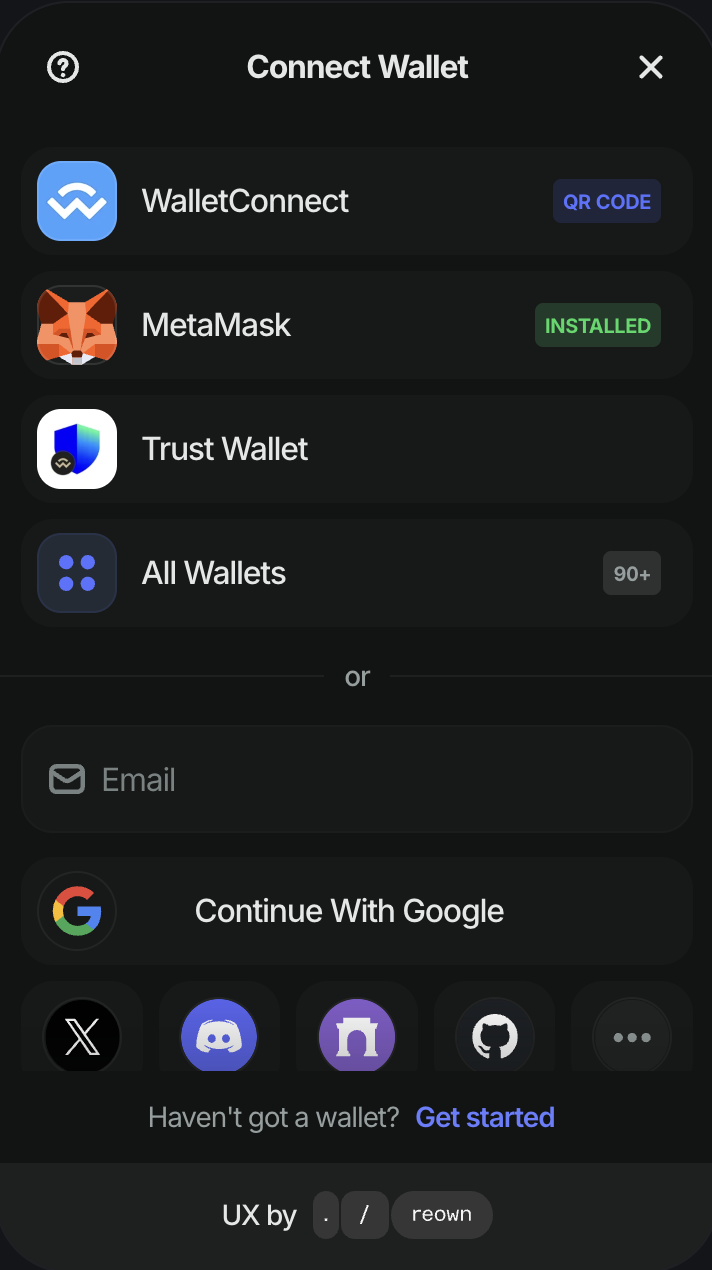
<div align="left"><figure><img src="https://1786796420-files.gitbook.io/~/files/v0/b/gitbook-x-prod.appspot.com/o/spaces%2FPrg38tsZBv433URqRSSf%2Fuploads%2F10GEAP0lFQv0gPySmo0m%2FScreenshot%202025-09-27%20at%202.14.38%E2%80%AFPM.png?alt=media&amp;token=9fb31986-7f10-4ffa-9766-74abfa5b8cb1" alt="" width="356"><figcaption><p>User Wallet for "Connect Wallet" </p></figcaption></figure></div>

You log in to Decimal using your own EOA wallet. We support 90+ options including MetaMask, WalletConnect, Trust Wallet, and more. This creates an Externally Owned Account (EOA) that stays fully under your control.

Prefer something simpler? You can also sign in using your favorite social account: email, Google, Twitter, Discord, Farcaster, GitHub, Apple ID, or Facebook.

**Role of the Master Wallet:**

* Logs you into the application
* Manages all your credentials
* Owns and authorises all your workflows (created, stored and executed under this wallet)
* Handles any manual approvals within workflows

{% hint style="danger" %} <mark style="color:$danger;">**Important:**</mark> If you lose access to this wallet, you also lose access to all your workflows.
{% endhint %}

***

#### 2. Sub-Wallet(s)

For every Master Wallet, you get one complimentary Sub-Wallet. This wallet is fully managed by your Master Wallet and cannot be accessed separately.

Sub-Wallets are secured inside Trusted Execution Environments (TEEs) and cannot be accessed in any way other than through your Master Wallet login.&#x20;

**Role of the Sub-Wallet:**

* This is the primary wallet if you intend to run your workflows autonomously.
* Powers all autonomous execution capabilities across chains and dApps.
* Most of our nodes are designed to work with Decimal Wallets.

{% hint style="warning" %}
**ADVANCED USER ONLY:** For extra control, you can download the private key of your Decimal Wallet - though this is recommended only for advanced users.
{% endhint %}

{% hint style="info" %}
**PREMIUM UPGRADE:** Corporate builders can request extra Decimal Wallets under their User Wallet.&#x20;

Each Decimal Wallet can run its own workflows, portfolios, or trading strategies while staying securely managed under one user account. It’s a flexible way to organize, scale, and experiment with different approaches.
{% endhint %}

***

### Step 2: Fund your sub-wallet

Once your sub-wallets are created, you’ll need to fund them with the native tokens of the chains you intend to run on. These tokens cover gas fees and, if designed, are also used directly within your workflows.

{% hint style="warning" %}
Without enough balance, your workflows may fail midway due to insufficient funds
{% endhint %}

By enrolling for a sub-wallet; your account is auto-enrolled in a monthly free tier. The free tier provides you with 5k monthly credits that you can use to get started. If these credits are not sufficient, you can enroll for any paid plan to avail higher credits.

{% hint style="success" %}
**LIMITED TIME LAUNCH OFFER:** You get a total of monthly 10k credits (5k base+5k bonus)
{% endhint %}

&#x20;

***

**Setup complete!**

Now let’s put your workflows on auto-pilot.


# Quickstart: Your 1st workflow in 5 mins

Welcome! Let’s get you from idea → automation right away.

> It’s the rare moment of delight when your mom asks how your crypto app works, and you can literally show her a flow that runs itself, no tutorials needed.
>
> The satisfaction of seeing something complex, feel simple.

***

{% hint style="info" %}
Make sure your [setup](/technical/setup) is complete before you start creating workflows.
{% endhint %}

### Step 1: Create your First Workflow

1. Log into your Decimal application
2. Click **New Workflow** → give it a name (e.g., *Get the latest ETH price*).
3. You’ll see an empty canvas (like a whiteboard) - this is where your workflow comes alive.

### Step 2: Add a Trigger

* Click **Add Node** → opens the *Editor* panel on the panel
* Under **TRIGGER** section, click and drop the **Trigger** node onto the canvas
* This node marks the *start* of your workflow.&#x20;

### Step 3: Add an Action

* Search for **Coingecko** in the right panel.
* Click and drop the **Fetch Token Price** node from the **COINGECKO** section onto the canvas.
* Hover over the node, and click the ⛯ (Settings) icon.
* Select `Free` API plan and enter your API Key: `CG-KYMXxxie947QdgQNQEcoYhJ7` . Click Validate & Continue
* Select `usd` from the VS Currency and `eth` (Ethereum) for Token dropdowns. Leave the **Result Variable Name** as `coingeckoResult`
* Click outside of the modal to save the settings.

### Step 4: Connect the Nodes

* Click on the ⊕ (output) of the **Trigger** node.&#x20;
* Then click the activated ▷ (input) of the **Fetch Token Price** node.
* A blue connecting line appears, showing the order of execution.

### Step 5: Run

* Hit the blue **Play** button in the footer.
* Both nodes should show a green badge - indicating successful execution - along with a notification.
* Open the **Logs** tab in the right sidebar to see execution details for each node. Under the **Fetch Token Price** log, the `coingeckoResult.responseData.ethereum.usd` variable will display the latest `ETH` price.

&#x20;

***

🎉 <mark style="color:orange;">**Congrats!**</mark> You've just built and run your first workflow successfully.


# Learning Path

This guide outlines a series of tutorials and resources designed to get you started with decimal.&#x20;

It's not necessary to complete all items listed to start using decimal. Use this as a reference to navigate to the most relevant parts of the documentation and other resources according to your needs.

### Join the community <a href="#join-the-community" id="join-the-community"></a>

Decimal has an active community where you can get and offer help. Connect, share, and learn with other fellow builders:

* Follow our progress and updates on Twitter, Telegram, Discord.
* [Ask questions](https://community.n8n.io/t/readme-welcome-to-the-n8n-community/44381) and [make feature requests](https://community.n8n.io/c/feature-requests) in the Community Forum.

***

### Setup decimal

If you don't have an account yet, sign up to a [free trial on n8n Cloud](https://app.n8n.cloud/register) or install n8n's community edition with [Docker](https://docs.n8n.io/hosting/installation/docker/) (recommended) or [npm](https://docs.n8n.io/hosting/installation/npm/). See [Choose your n8n](https://docs.n8n.io/choose-n8n/) for more details.

***

### Try it out

Start with the quickstart guides to help you get up and running with building basic workflows.&#x20;

* [A very quick quickstart](https://docs.n8n.io/try-it-out/quickstart/)
* [A longer introduction](https://docs.n8n.io/try-it-out/tutorial-first-workflow/)
* [Build an AI workflow in n8n](https://docs.n8n.io/advanced-ai/intro-tutorial/)

***

### Structured Courses <a href="#structured-courses" id="structured-courses"></a>

Decimal offers two sets of courses.

#### Video courses

Learn key concepts and n8n features, while building examples as you go.

* The [Beginner](https://www.youtube.com/playlist?list=PLlET0GsrLUL59YbxstZE71WszP3pVnZfI) course covers the basics of n8n.
* The [Advanced](https://www.youtube.com/playlist?list=PLlET0GsrLUL5bxmx5c1H1Ms_OtOPYZIEG) course covers more complex workflows, more technical nodes, and enterprise features

#### Text courses <a href="#text-courses" id="text-courses"></a>

Build more complex workflows while learning key concepts along the way. Earn a badge and an avatar in your community profile.&#x20;

* [Level 1: Beginner Course](https://blog.n8n.io/announcing-the-n8n-certification-course-for-beginners-level-1/)
* [Level 2: Intermediate Course](https://blog.n8n.io/announcing-course-level-two/)

***

### Build a node <a href="#build-a-node" id="build-a-node"></a>

If you can't find a node for a specific app or a service, you can build a node yourself and share with the community. See what others have built on [npm website](https://www.npmjs.com/search?q=keywords:n8n-community-node-package).&#x20;

* [Build a declarative-style node](https://docs.n8n.io/integrations/creating-nodes/build/declarative-style-node/)
* [Learn how to build your own n8n nodes (Youtube Video)](https://www.youtube.com/live/OI6zHJ56eW0?si=SMD7L1J5fZ2mf79W)

***

### Stay updated <a href="#stay-updated" id="stay-updated"></a>

* Follow new features and bug fixes in the [Release Notes](https://docs.n8n.io/release-notes/)
* Follow n8n on socials: [Twitter/X](https://twitter.com/n8n_io), [Discord](https://discord.com/invite/vWwMVThRta), [LinkedIn](https://www.linkedin.com/company/n8n/), [YouTube](https://www.youtube.com/@n8n-io)

***

[<mark style="color:orange;">In short</mark> – many roads, one destination.](#user-content-fn-1)[^1]

[^1]:


# Building with Decimal

* Creating Workflows (drag-and-drop basics)
* Connecting dApps
* Chaining multiple steps
* Error handling / retries
* Debugging workflows

### <mark style="color:blue;">1. Trigger Nodes</mark>

Trigger nodes define when a workflow starts.

* **Web3 Triggers:**
  * Wallet Activity (send/receive transaction)
  * Token Transfer (ERC-20, NFT, stablecoin, etc.)
  * Smart Contract Event (custom ABI events)
  * Token Price Threshold (crossing a set value)
  * DAO Activity (proposal created, vote passed)
  * On-chain Time/Event (block height, scheduled execution)
* **Web2 Triggers:**
  * Webhook Received
  * Calendar Event (Google Calendar, Outlook, etc.)
  * Payment Received (Stripe, PayPal)
  * Form Submission (Typeform, Google Forms)
  * CRM Activity (new lead in HubSpot, Salesforce)

### <mark style="color:blue;">2. Action Nodes</mark>

Action nodes define what happens once the workflow is triggered.

* **Web3 Actions:**
  * Send Funds (native token, ERC-20, stablecoins)
  * Mint / Burn NFT
  * Deploy Smart Contract
  * Execute Smart Contract Function (read/write)
  * Create Wallet / Assign Role
  * Multi-sig Execution
  * Cross-chain Bridge Asset
  * Swap Tokens (via DEX aggregator)
* **Web2 Actions:**
  * Send Email (Gmail, Outlook, SMTP)
  * Send Chat Message (Slack, Discord, Telegram)
  * Create Task (Notion, Asana, Trello)
  * Update Database (Airtable, Google Sheets)
  * Post to Social (Twitter/X, LinkedIn)
  * Make API Request (generic REST/GraphQL calls)

### <mark style="color:blue;">3. Utility Nodes</mark>

Utility nodes add logic, flow control, and structure.

* **Logic Control:**
  * If / Else Branch
  * Switch / Case
  * Loop (repeat until condition met)
  * Delay / Wait (time-based pause)
  * Approval Step (manual confirmation)
* **Data Handling:**
  * Transform Data (map, filter, aggregate)
  * Math Operations
  * String Operations
  * JSON Parse / Build
  * Format (date, currency, decimals)
* **Execution Control:**
  * Error Handling (retry, fallback path)
  * Parallel Execution (run multiple branches)
  * Merge (combine results back into single flow)


# Tutorials & Recipes

* Web3 + Web3 Examples
  * Auto-stake farming rewards
  * Mint & distribute NFTs
  * DAO treasury monitoring
* Web3 + Web2 Examples
  * Tweet when a smart contract event happens
  * Send Discord alert for token transfers
  * Push portfolio updates into Google Sheets
* Community Recipes (user-contributed flows)

### <mark style="color:blue;">1. Trigger Nodes</mark>

Trigger nodes define when a workflow starts.

* **Web3 Triggers:**
  * Wallet Activity (send/receive transaction)
  * Token Transfer (ERC-20, NFT, stablecoin, etc.)
  * Smart Contract Event (custom ABI events)
  * Token Price Threshold (crossing a set value)
  * DAO Activity (proposal created, vote passed)
  * On-chain Time/Event (block height, scheduled execution)
* **Web2 Triggers:**
  * Webhook Received
  * Calendar Event (Google Calendar, Outlook, etc.)
  * Payment Received (Stripe, PayPal)
  * Form Submission (Typeform, Google Forms)
  * CRM Activity (new lead in HubSpot, Salesforce)

### <mark style="color:blue;">2. Action Nodes</mark>

Action nodes define what happens once the workflow is triggered.

* **Web3 Actions:**
  * Send Funds (native token, ERC-20, stablecoins)
  * Mint / Burn NFT
  * Deploy Smart Contract
  * Execute Smart Contract Function (read/write)
  * Create Wallet / Assign Role
  * Multi-sig Execution
  * Cross-chain Bridge Asset
  * Swap Tokens (via DEX aggregator)
* **Web2 Actions:**
  * Send Email (Gmail, Outlook, SMTP)
  * Send Chat Message (Slack, Discord, Telegram)
  * Create Task (Notion, Asana, Trello)
  * Update Database (Airtable, Google Sheets)
  * Post to Social (Twitter/X, LinkedIn)
  * Make API Request (generic REST/GraphQL calls)

### <mark style="color:blue;">3. Utility Nodes</mark>

Utility nodes add logic, flow control, and structure.

* **Logic Control:**
  * If / Else Branch
  * Switch / Case
  * Loop (repeat until condition met)
  * Delay / Wait (time-based pause)
  * Approval Step (manual confirmation)
* **Data Handling:**
  * Transform Data (map, filter, aggregate)
  * Math Operations
  * String Operations
  * JSON Parse / Build
  * Format (date, currency, decimals)
* **Execution Control:**
  * Error Handling (retry, fallback path)
  * Parallel Execution (run multiple branches)
  * Merge (combine results back into single flow)


# Core Concepts

Decimal is built on a few simple building blocks. Once you understand these, you can create anything — from a simple reminder to a cross-chain automation spanning dozens of apps.

### <mark style="color:blue;">1. Accounts</mark>

### <mark style="color:blue;">2. Workflows</mark>

* A workflow is a **sequence of steps** that runs automatically.
* Each workflow has:
  * Trigger(s) → what starts it.
  * Action(s) → what it does.
  * Optional Logic → how it decides to branch, repeat, or stop.
* <mark style="color:orange;">Analogy:</mark> *A relay race where one runner passes the baton to the next until the finish line.*

### <mark style="color:blue;">3. Triggers</mark>

* Triggers are ***events that start a workflow***.
* Types of triggers:
  * Web3: Wallet balance change, new transaction, token price movement, NFT mint, DAO proposal.
  * Web2: New form submission, calendar invite, payment received, webhook.
* <mark style="color:orange;">Analogy:</mark> *Like flipping a light switch to power on a circuit.*

### <mark style="color:blue;">4. Actions</mark>

* Actions are ***what happens next*** once a workflow is triggered.
* Examples:
  * Send funds, mint/burn an NFT, post to Discord, email your team, run an API call.
* <mark style="color:orange;">Analogy:</mark> *Dominoes falling one after another — each action pushes the next forward.*

### <mark style="color:blue;">5. Nodes</mark>&#x20;

* Each Trigger or Action sits inside a Node.
* Types of nodes:
  * Trigger nodes
  * Action nodes
  * Utility nodes (IF/ELSE, delays, loops, approvals, etc.)
* *<mark style="color:orange;">Analogy:</mark>* Each node is like a LEGO brick — each one does something specific, and you connect them together to build something beautiful.

### <mark style="color:blue;">6. Connections</mark>

* The lines between nodes define data flow (what output from one step becomes input for the next).&#x20;
* Connections can be 1-on-1s, splits or merges to manage sequential or parallel execution paths.
* Example: A “Price Feed Node” outputs ETH = $2500 → “Telegram Node” takes that and sends: *“ETH just hit $2500 🚀”*.

### <mark style="color:blue;">7. Logic & Control</mark>

* Not everything is linear. Decimal supports:
  * If/Else Conditions → branch your workflow.
  * Loops → repeat until done.
  * Delays / Scheduling → run later or at intervals.
  * Approvals → require human confirmation.
* *<mark style="color:orange;">Analogy:</mark>* *Like choosing different routes in Google Maps depending on traffic conditions.*

### <mark style="color:blue;">8. Execution</mark>

* Once satisfied, a Web3 workflow can run:
  * Autonomously → executes end-to-end without interruption using Decimal Account.
  * With Approvals → pauses at certain points until a human confirms using User Account or certain Web2 nodes.
* Key idea: You decide the balance between speed vs control.


# Advanced Usage

* Custom Code Nodes (for edge cases)
* Secrets & Environment Variables (API keys, wallets)
* Multi-chain workflows
* Event-driven Automations (capture opportunities instantly)
* Collaboration (sharing workflows across teams/DAOs)

### <mark style="color:blue;">1. Trigger Nodes</mark>

Trigger nodes define when a workflow starts.

* **Web3 Triggers:**
  * Wallet Activity (send/receive transaction)
  * Token Transfer (ERC-20, NFT, stablecoin, etc.)
  * Smart Contract Event (custom ABI events)
  * Token Price Threshold (crossing a set value)
  * DAO Activity (proposal created, vote passed)
  * On-chain Time/Event (block height, scheduled execution)
* **Web2 Triggers:**
  * Webhook Received
  * Calendar Event (Google Calendar, Outlook, etc.)
  * Payment Received (Stripe, PayPal)
  * Form Submission (Typeform, Google Forms)
  * CRM Activity (new lead in HubSpot, Salesforce)

### <mark style="color:blue;">2. Action Nodes</mark>

Action nodes define what happens once the workflow is triggered.

* **Web3 Actions:**
  * Send Funds (native token, ERC-20, stablecoins)
  * Mint / Burn NFT
  * Deploy Smart Contract
  * Execute Smart Contract Function (read/write)
  * Create Wallet / Assign Role
  * Multi-sig Execution
  * Cross-chain Bridge Asset
  * Swap Tokens (via DEX aggregator)
* **Web2 Actions:**
  * Send Email (Gmail, Outlook, SMTP)
  * Send Chat Message (Slack, Discord, Telegram)
  * Create Task (Notion, Asana, Trello)
  * Update Database (Airtable, Google Sheets)
  * Post to Social (Twitter/X, LinkedIn)
  * Make API Request (generic REST/GraphQL calls)

### <mark style="color:blue;">3. Utility Nodes</mark>

Utility nodes add logic, flow control, and structure.

* **Logic Control:**
  * If / Else Branch
  * Switch / Case
  * Loop (repeat until condition met)
  * Delay / Wait (time-based pause)
  * Approval Step (manual confirmation)
* **Data Handling:**
  * Transform Data (map, filter, aggregate)
  * Math Operations
  * String Operations
  * JSON Parse / Build
  * Format (date, currency, decimals)
* **Execution Control:**
  * Error Handling (retry, fallback path)
  * Parallel Execution (run multiple branches)
  * Merge (combine results back into single flow)


# Node Directory

## Node Directory

The Node Directory provides an overview of all available nodes in Decimal and how they are used to build automation workflows.

Nodes are the fundamental building blocks of every workflow. Each node represents a single, well-defined action that can be composed with others to create reliable, production-ready automation.

***

### What is a Node?

A **node** is a modular unit of functionality that performs a specific task within a workflow.

Examples of node responsibilities include:

* Triggering workflow execution
* Connecting wallets
* Transferring funds
* Fetching external data
* Executing logic and conditions
* Running custom code

Nodes are designed to be predictable, reusable, and easy to configure.

***

### How Nodes Work

Nodes execute as part of a workflow in a defined order.

Each node:

* Accepts inputs (static values or variables)
* Executes a specific operation
* Produces outputs that can be passed to downstream nodes

This model allows workflows to remain flexible while preserving clarity and control.

***

### Node Categories

Nodes in Decimal are grouped by functionality to make discovery easier.

#### **Trigger Nodes**

Trigger nodes define when a workflow starts.\
Every workflow begins with exactly one trigger node.

#### **Wallet & Transaction Nodes**

These nodes handle blockchain interactions such as wallet connections, message signing, and fund transfers.

#### **Data & API Nodes**

Used to fetch and process off-chain data from external APIs and services.

#### **Logic & Control Nodes**

Nodes that control execution flow, including conditional logic and variable handling.

#### **Custom Execution Nodes**

Nodes that allow custom logic through code execution when predefined nodes are not sufficient.

***

### Node Configuration

Each node includes a configuration panel where you can:

* Define required inputs
* Select connections or credentials
* Reference variables from previous steps
* Control execution behavior

Configuration is validated before execution to reduce runtime errors.

***

### Composability & Reuse

Nodes are designed to be fully composable.

You can:

* Reuse the same node across multiple workflows
* Combine nodes in different sequences
* Extend workflows without breaking existing logic

This makes it easy to iterate and scale automation over time.

***

### Error Handling & Observability

Nodes report execution status and outputs during runtime.

This allows you to:

* Identify failures quickly
* Inspect node-level inputs and outputs
* Debug workflows efficiently

Clear execution boundaries help isolate issues without impacting unrelated steps.

***

### Available Nodes

The Node Directory includes detailed documentation for each supported node, including:

* Purpose and behavior
* Required and optional inputs
* Outputs and variable references
* Common usage patterns

Use the sidebar to navigate to individual node pages for in-depth configuration details and examples.


# Manual Run

The Trigger Node marks the start of any workflow.

### Overview

The **Manual Run** trigger allows you to execute a workflow **on demand** with a single click. It is designed for testing, debugging, and ad-hoc executions where you want full control over when a workflow runs.

Unlike time-based or automated triggers, Manual Run only executes when explicitly initiated by the user.

***

### What Manual Run Does

Manual Run acts as a **user-initiated trigger** that starts the workflow instantly when clicked. It does not rely on schedules, events, or external conditions.

Key capabilities include:

* Instant workflow execution
* Safe testing of nodes and integrations
* On-demand execution without automation
* Ideal for development and debugging workflows

***

### How It Works

* The **Manual Run** node appears on the canvas as a trigger.
* Clicking the **Run** (play) button immediately starts the workflow.
* All connected nodes execute sequentially based on the workflow logic.
* No background or recurring execution occurs.

***

### Configuration Options

The Manual Run trigger requires **no configuration**.

There are:

* No time settings
* No repeat intervals
* No parameters

This simplicity ensures predictable, controlled executions, on-demand - directly from the canvas.

***

### Common Use Cases

* **Testing workflows before deployment**
* **Debugging smart contract interactions**
* **Triggering one-off blockchain transactions**
* **Running ad-hoc data reads or API calls**
* **Validating integrations and node outputs**

***

### Example Workflow

**Scenario:** Test a fund transfer workflow before scheduling it.

1. Use **Manual Run** as the trigger.
2. Connect wallet, set variables, and add a fund transfer node.
3. Click **Run** to execute instantly.
4. Review logs and results.


# Schedule Trigger

### Overview

The Schedule Trigger (**Scheduler**) allows you to execute workflows automatically based on time. Instead of triggering actions manually, you can schedule workflows to run **once at a specific time** or **repeatedly at fixed intervals**.

This is ideal for automation use cases such as recurring on-chain actions, periodic data fetches, routine fund transfers, or timed smart contract interactions.

***

### What the Scheduler Does

The Scheduler acts as a **time-based trigger** that starts your workflow execution according to predefined rules. Once configured, it runs independently without manual intervention.

Key capabilities include:

* Delayed execution (run after a set duration)
* One-time scheduled runs
* Recurring executions at regular intervals
* Minute, hour, or day-level granularity

***

### Configuration Options

#### 1. Schedule Type

Choose how you want to define the execution time:

* **Schedule In**\
  Runs the workflow after a specified duration (e.g., after 10 minutes).
* **Schedule At**\
  Runs the workflow at an exact date and time.

***

#### 2. When to Run

Defines whether the workflow executes once or repeatedly:

* **Run Once**\
  Executes the workflow a single time based on the schedule.
* **Repeat Every**\
  Executes the workflow repeatedly at the defined interval.

***

#### 3. Run In (Value)

Specifies the numeric duration before execution (used with **Schedule In**).

Example:

* Value: <mark style="color:$primary;">10</mark>
* Unit: <mark style="color:$primary;">Minutes</mark>
* Result: Workflow runs after 10 minutes

***

#### 4. Unit

Defines the time unit for scheduling:

* Minutes
* Hours
* Days

***

#### 5. Schedule Preview

Displays a human-readable summary of when the workflow will run.\
This helps verify your configuration before activating the schedule.

Example:

> **Run once in 10 minutes**

***

### Common Use Cases

* **Recurring blockchain monitoring**
* **Delayed smart contract execution**
* **Automated periodic fund transfers**
* **Scheduled data reads or API calls**
* **Time-based notifications or alerts**

***

### Example Workflow

**Scenario:** Run a workflow every 10 minutes to fetch on-chain data.

* Schedule Type: `Schedule In`
* When to Run: `Repeat Every`
* Run In: `10`
* Unit: `Minutes`

Result: The workflow executes automatically every 10 minutes.

***

###


# Webhook

### Overview

The **Webhook** allows you to execute workflows remotely from external sources. Instead of triggering actions manually, or on some set precise time, you can now run workflows real-time in response to or **reaction to certain external events**.

This is ideal for automation use cases such as monitoring user cases, for real-time interactions based on certain other external triggers.

***

### What the Webhook Do

The Webhook acts as a **event-based trigger** that starts your workflow execution in reaction to any external event. Once configured, it runs independently without manual intervention.

{% hint style="info" %}
The webhook is configured so that no duplicate requests can be made within 2 seconds. This is to ensure duplicate requests are not made out in error, and to ensure any DDOS attacks.

Hence, please make sure to wait 2 seconds before making a 2nd request; else it will return a failed message.
{% endhint %}

The webhook comes some few key security capabilities:

* **None:** Quick and easy setup with an open access; perfect for the public-facing utilities. Anyone with access to the given link or by clicking the link (either from a form or button) will directly trigger the workflow.
* **Basic Auth:** A basic way to keep your things private with a user defined username and password. This is a basic&#x20;
* **JWT Token:** Enterprise grade security best suited for enterprises.

***

### Configuration Options

#### 1. Security

Choose your desired security level from any of the following options:

* **None**
* **Basic Auth (Username/Password)**
* **JWT Tokens (Enterprise grade security)**

***

#### 2. Create Webhook link

By clicking the set button, it generates a unique webhook URL link:

* This URL is very unique and specific to your given workflow only.
* You have the provision to reset it anytime you feel that the link has been compromised or exposed.

***

#### 3. Trigger

You can now go ahead and copy-paste that generated webhook URL to your destination locaiton.

Example:

* Web browser
* 3rd party applications (Zapier, Make.com, n8n etc)
* Postman

***

### Common Use Cases

* **Event monitoring**
* **Delayed smart contract execution**
* **Automated periodic fund transfers**
* **Scheduled data reads or API calls**
* **Time-based notifications or alerts**

***

### Example Workflow

**Scenario:** Run a Web3 workflow when a n8n has completed certain process.

* Webhook: `URL`
* When to Run: `n8n API call node is executed`&#x20;

Result: The Web3 workflow executes automatically every time the API node in n8n is executed.

***

###


# HTTP API

### Overview

The Call API integration allows you to make HTTP requests to any external API directly from a Decimal workflow. It acts as a universal connector when a native integration is not available or when you need full control over request structure.

This integration is commonly used to:

* Connect third-party services
* Fetch or push data to external systems
* Trigger internal or external workflows
* Extend Decimal beyond prebuilt integrations

Call API works as a workflow node and can be combined with logic, variables, and transformation nodes.

***

### Available Module

#### Call API

Makes an HTTP request to a specified URL using standard HTTP methods and stores the response in a workflow variable.

Supported request types include:

* GET
* POST
* PUT
* PATCH
* DELETE

***

### When to Use Call API

Use Call API when:

* A native integration does not exist
* You need custom headers or authentication
* You are building flexible or experimental workflows<br>

For common or repeated use cases, native integrations are recommended where available.

***

### Adding Call API to a Workflow

1. Open the Decimal workflow editor
2. Add a Trigger node
3. From Integration, select Call API
4. Connect the Call API node to your trigger\ <br>

Once added, the Call API Settings panel opens automatically.

![](https://1786796420-files.gitbook.io/~/files/v0/b/gitbook-x-prod.appspot.com/o/spaces%2FPrg38tsZBv433URqRSSf%2Fuploads%2F1C3t1Lz3pAPOPkUqSUqi%2Funknown.png?alt=media\&token=9ac0d3d8-0ec3-4bdf-b687-c23b89ff4900)

***

### Module Configuration

#### HTTP Method

Select the HTTP method for the request.

Supported options:

* GET – Fetch data
* POST – Send data
* PUT – Update data
* PATCH – Partially update data
* DELETE – Remove data<br>

Choose the method based on the API you are calling.

***

#### URL

Enter the full endpoint URL for the request.

**Example**:

*<https://api.example.com/data>*

This field is required.\
If left empty, the node will not execute.

***

#### Headers

Headers allow you to pass metadata and authentication information with the request.

**Default Header**

* Content-Type: application/json

This header is enabled by default and can be modified or removed if needed.

**Optional Headers**

* Authorization – Commonly used for API keys or Bearer tokens
* User-Agent – Used by some APIs for request identification\ <br>

You can:

* Enable or disable headers using the checkbox
* Edit header values
* Remove headers using the ❌ icon
* Add additional headers using + Add Header

***

#### Request Body

The request body is used for:

* POST
* PUT
* PATCH

Enter a valid JSON payload.

**Example**:

<mark style="color:$primary;">{</mark>

&#x20; <mark style="color:$primary;">"key": "value"</mark>

<mark style="color:$primary;">}</mark>

For GET requests, the request body is ignored.

![](https://1786796420-files.gitbook.io/~/files/v0/b/gitbook-x-prod.appspot.com/o/spaces%2FPrg38tsZBv433URqRSSf%2Fuploads%2F69DysgfOX0XMBP6gh8LN%2Funknown.png?alt=media\&token=8b40fde1-b617-49cb-b6f3-ceff8172a174)

***

#### Result Variable Name

Define the variable name that will store the HTTP response.

Default example:

*httpResult*

This variable becomes available to all downstream nodes in the workflow.

***

### Output & Variables

After execution, the response from the API is stored under the specified result variable.

Typical response data includes:

* Status code
* Response body
* Headers (if supported)\ <br>

**Example usage in downstream nodes:**

*httpResult.body*

*httpResult.status*

This data can be:

* Passed to logic nodes (If Else)
* Transformed using Run Code
* Stored using Set Variable
* Used to trigger further actions

***

### Example Workflow

Use Case: Fetch data from an external API and process it.

Workflow:

1. Trigger
2. Call API
3. If Else (check response)
4. Run Code or Set Variable

This allows you to build API-driven workflows without external services or scripts.

<br>


# PARTNER: CoinGecko price feed

### Overview

The CoinGecko integration allows you to fetch real-time cryptocurrency price data directly inside a Decimal workflow. It is commonly used for price monitoring, automation triggers, reporting, and downstream financial or Web3 actions.

This integration works as a node in the Decimal workflow editor and can be connected to any trigger or automation logic.

### Available Modules

#### Fetch Token Price

Fetches the current price of a selected cryptocurrency using CoinGecko data.

This module supports both free and paid CoinGecko API access, depending on your usage needs.

***

### Supported Modes

#### Free API (Demo)

* Uses CoinGecko’s free demo API
* Suitable for testing, prototyping, and low-frequency workflows
* Subject to strict rate limits
* Uses CoinGecko’s paid API
* Higher rate limits
* Recommended for production workflows and frequent executions<br>

***

### Adding CoinGecko to a Workflow

1. Open the Decimal workflow editor
2. Add a Trigger node
3. From the Web3 → CoinGecko section, select Fetch Token Price
4. Connect the CoinGecko node to your trigger\
   ![](https://1786796420-files.gitbook.io/~/files/v0/b/gitbook-x-prod.appspot.com/o/spaces%2FPrg38tsZBv433URqRSSf%2Fuploads%2FnrlJE8wSzHnnmA1aB6RM%2Funknown.png?alt=media\&token=00c69731-0a0f-4516-9156-fcbbb982f705)

Once added, the configuration modal will open automatically.

***

### Module Configuration

#### Step 1: API Configuration

**API Plan**

Select the API plan you want to use:

* Free – Uses CoinGecko Demo API
* Pro – Uses CoinGecko Paid API\ <br>

**API Key**

* Go to the CoinGecko website and sign in or create an account:[ https://www.coingecko.com](https://www.coingecko.com)
* Navigate to the Developer Dashboard to generate your API key: <https://www.coingecko.com/en/developers/dashboard>
* Copy the API key and use it while configuring the CoinGecko integration in Decimal.

Decimal validates the API key before proceeding.

Click Validate & Continue to move to the next step.

![](https://1786796420-files.gitbook.io/~/files/v0/b/gitbook-x-prod.appspot.com/o/spaces%2FPrg38tsZBv433URqRSSf%2Fuploads%2FcP3Vj2EUJ8acHYIYpJ33%2Funknown.png?alt=media\&token=08ec9ee2-0123-4605-b4ce-c9114fed7a48)

***

#### Step 2: Token & Currency Configuration

**VS Currency**

Select the currency in which the token price should be returned.\
Example: usd

**Token**

Choose the cryptocurrency whose price you want to fetch.\
Example: *bitcoin*

**Result Variable Name**

Define the variable name where the result will be stored.

Example:

*coingeckoResult*

This variable will be available to all downstream nodes in the workflow.

![](https://1786796420-files.gitbook.io/~/files/v0/b/gitbook-x-prod.appspot.com/o/spaces%2FPrg38tsZBv433URqRSSf%2Fuploads%2FcyKCtsmLL0oEBAWtBEiV%2Funknown.png?alt=media\&token=a09f9c08-296d-4935-a881-4435d62e103f)

***

### Output & Variables

After execution, the module stores the fetched data under the specified result variable.

Typical data includes:

* Token price
* Currency used
* Last updated timestamp<br>

Example usage in downstream nodes:

*coingeckoResult.price*

*coingeckoResult.currency*

***

### Example Workflow

Use Case: Fetch Bitcoin price and use it in a downstream automation.

Workflow:

1. Trigger (manual or scheduled)
2. Fetch Token Price (CoinGecko)
3. Use the price in a notification, condition, or data store

This setup allows automated price-based workflows without external scripts.

<br>


# PARTNER: 1inch Bridge

### Overview

The 1inch Bridge allows you to perform token bridge using the 1inch aggregation protocol directly inside a Decimal workflow. It enables automated, cross-chain token bridge while leveraging 1inch’s routing and liquidity optimisation.

This integration is designed for Web3-native workflows where swaps need to be executed programmatically, conditionally, or as part of a larger automation.

Common use cases include:

* Cross-chain asset movement
* Treasury and fund management workflows
* Strategy-based DeFi automation

***

### Available Module

#### 1inch Bridge

Executes a token bridge using 1inch based on the configured source token, destination token, chain, and amount.

***

### When to use 1inch Bridge

Use the 1inch node when:

* You need to bridge tokens programmatically
* Swaps are part of a larger automated workflow
* You want best-route aggregation without manual execution
* You need cross-chain token movement

This node is typically used after wallet connection and before downstream actions like transfers or contract calls.

***

### Adding 1inch to a Workflow

1. Open the Decimal workflow editor
2. Add a Trigger node
3. From Web3, select 1inch Bridge
4. Connect the node to the trigger or previous step

Once added, the 1inch Settings panel opens automatically.

***

### Module Configuration

#### From Token

Select the source token to bridge from.

Example:

*<mark style="color:$primary;">ETH (Ether)</mark>*

Note: Native tokens (e.g. ETH) may not be supported as source tokens directly. In such cases, use the wrapped version (e.g. WETH).

***

#### Destination Chain

Select the destination chain for the bridge.

Example:

*<mark style="color:$primary;">Base</mark>*

For cross-chain swaps, the destination chain must be different from the source chain.

***

#### To Token

Select the destination token to receive.

Example:

*<mark style="color:$primary;">WETH (Wrapped Ether)</mark>*

***

#### Amount

Enter the human-readable amount to bridge.

Example:

*<mark style="color:$primary;">0.1</mark>*

Decimal automatically handles token decimals during execution.

This field is required.

***

#### Recipient (Optional)

Specify a recipient wallet address for the bridge tokens.

* If left empty, tokens are received in the connected wallet
* Useful for routing funds to external wallets or contracts<br>

Example:

*<mark style="color:$primary;">0x...</mark>*

***

### Output & Execution

When executed, the 1inch node:

* Fetches the optimal bridge route
* Executes the bridge onchain
* Returns execution details to the workflow

Typical output includes:

* Transaction hash
* Source and destination tokens
* Amounts swapped
* Execution status

These results can be used in downstream nodes for validation, logging, or follow-up actions.

***

### Example Workflow

Use Case: Bridge ETH to WETH automatically.

Workflow:

1. Trigger
2. Wallet Connection
3. 1inch Bridge
4. If Else (validate execution)
5. Transfer or store result

This enables fully automated swap workflows without manual intervention.

***

**Here are the official 1inch references**&#x20;

* 1inch Documentation:[ https://docs.1inch.io](https://docs.1inch.io)
* 1inch Developer Docs (API & Protocol):[ https://portal.1inch.dev](https://portal.1inch.dev)
* 1inch on X (Twitter):[ https://x.com/1inch](https://x.com/1inch)


# PARTNER: LayerZero Bridge

### Overview

The LayerZero Bridge allows you to perform token bridge using the LayerZero core asset transfer protocol directly inside a Decimal workflow. It enables automated, cross-chain token bridge while leveraging LayerZero’s routing and liquidity optimisation.

This integration is designed for Web3-native workflows where cross-chain asset bridging needs to be executed programmatically, conditionally, or as part of a larger automation.

Common use cases include:

* Cross-chain asset movement
* Treasury and fund management workflows
* Strategy-based DeFi automation

***

### Available Module

#### LayerZero Bridge

Executes a token bridge using LayerZero based on the configured source token, destination token, chain, and amount.

***

### When to use LayerZero Bridge

Use the LayerZero node when:

* You need to bridge tokens programmatically
* Bridges are part of a larger automated workflow
* You want best-route aggregation without manual execution
* You need cross-chain token movement

This node is typically used after wallet connection and before downstream actions like transfers or contract calls.

***

### Adding LayerZero to a Workflow

1. Open the Decimal workflow editor
2. Add a Trigger node
3. From Web3, select LayerZero Bridge
4. Connect the node to the trigger or previous step

Once added, the LayerZero Settings panel opens automatically.

***

### Module Configuration

#### From Token

Select the source token to bridge from.

Example:

*<mark style="color:$primary;">ETH (Ether)</mark>*

Note: Native tokens (e.g. ETH) may not be supported as source tokens directly. In such cases, use the wrapped version (e.g. WETH).

***

#### Destination Chain

Select the destination chain for the bridge.

Example:

*<mark style="color:$primary;">Base</mark>*

For cross-chain bridge, the destination chain must be different from the source chain.

***

#### To Token

Select the destination token to receive.

Example:

*<mark style="color:$primary;">WETH (Wrapped Ether)</mark>*

***

#### Amount

Enter the human-readable amount to bridge.

Example:

*<mark style="color:$primary;">0.1</mark>*

Decimal automatically handles token decimals during execution.

This field is required.

***

#### Recipient (Optional)

Specify a recipient wallet address for the bridge tokens.

* If left empty, tokens are received in the connected wallet
* Useful for routing funds to external wallets or contracts<br>

Example:

*<mark style="color:$primary;">0x...</mark>*

***

### Output & Execution

When executed, the LayerZero node:

* Fetches the optimal bridge route
* Executes the bridge onchain
* Returns execution details to the workflow

Typical output includes:

* Transaction hash
* Source and destination tokens
* Amounts bridged
* Execution status

These results can be used in downstream nodes for validation, logging, or follow-up actions.

***

### Example Workflow

Use Case: Bridge ETH (Ethereum) to WETH (Base) automatically.

Workflow:

1. Trigger
2. Wallet Connection
3. LayerZero Bridge
4. If Else (validate execution)
5. Transfer or store result

This enables fully automated bridge workflows without manual intervention.

***

**Here are the official 1inch references**&#x20;

* LayerZero Documentation: <https://docs.layerzero.network/>
* LayerZero Developer Docs (API & Protocol): <https://transfer.layerzero-api.com/v1>
* LayerZero on X (Twitter): <https://x.com/LayerZero_Core>


# PARTNER: LayerZero Swap

### Overview

The LayerZero Swap allows you to perform same-chain token swap using the LayerZero core asset transfer protocol directly inside a Decimal workflow. It enables automated, same-chain token swap while leveraging LayerZero’s routing and liquidity optimisation.

This integration is designed for Web3-native workflows where same-chain asset swapping needs to be executed programmatically, conditionally, or as part of a larger automation.

Common use cases include:

* Same-chain asset movement
* Treasury and fund management workflows
* Strategy-based DeFi automation

***

### Available Module

#### LayerZero Swap

Executes a token swap using LayerZero based on the configured source token, destination token, and amount.

***

### When to use LayerZero Swap

Use the LayerZero Swap node when:

* You need to same-chain swap tokens programmatically
* Swaps are part of a larger automated workflow
* You want best-route aggregation without manual execution
* You need same-chain token movement

This node is typically used after wallet connection and before downstream actions like transfers or contract calls.

***

### Adding LayerZero to a Workflow

1. Open the Decimal workflow editor
2. Add a Trigger node
3. From Web3, select LayerZero Swap
4. Connect the node to the trigger or previous step

Once added, the LayerZero Settings panel opens automatically.

***

### Module Configuration

#### From Token

Select the source token to bridge from.

Example:

*<mark style="color:$primary;">ETH (Ether)</mark>*

Note: Native tokens (e.g. ETH) may not be supported as source tokens directly. In such cases, use the wrapped version (e.g. WETH).

***

#### Destination Chain

This is defaulted to the same chain as the source chain.

Example:

*<mark style="color:$primary;">Base</mark>*

For cross-chain swaps, the destination chain must be different from the source chain. Choose the LayerZero Bridge node instead.

***

#### To Token

Select the destination token to receive.

Example:

*<mark style="color:$primary;">WETH (Wrapped Ether)</mark>*

***

#### Amount

Enter the human-readable amount to swap.

Example:

*<mark style="color:$primary;">0.1</mark>*

Decimal automatically handles token decimals during execution.

This field is required.

***

#### Recipient (Optional)

Specify a recipient wallet address for the destination tokens.

* If left empty, tokens are received in the connected wallet
* Useful for routing funds to external wallets or contracts in a single transaction.<br>

Example:

*<mark style="color:$primary;">0x...</mark>*

***

### Output & Execution

When executed, the LayerZero node:

* Fetches the optimal swap route
* Executes the bridge onchain
* Returns execution details to the workflow

Typical output includes:

* Transaction hash
* Source and destination tokens
* Amounts swapped
* Execution status

These results can be used in downstream nodes for validation, logging, or follow-up actions.

***

### Example Workflow

Use Case: Swap ETH to WETH on BASE automatically.

Workflow:

1. Trigger
2. Wallet Connection
3. LayerZero Swap
4. If Else (validate execution)
5. Transfer or store result

This enables fully automated swap workflows without manual intervention.

***

**Here are the official 1inch references**&#x20;

* LayerZero Documentation: [https://docs.layerzero.network/](https://docs.layerzero.network/v2/developers/value-transfer-api/api-reference/overview)
* LayerZero Developer Docs (API & Protocol):[ https://portal.1inch.dev](https://portal.1inch.dev)
* LayerZero on X (Twitter):[ https://x.com/1inch](https://x.com/1inch)


# If Else

### Overview

The If Else allows you to add conditional logic to a Decimal workflow. It evaluates a condition and determines whether the workflow should proceed based on the result.

This node is used to:

* Make decisions inside workflows
* Branch logic based on data values
* Validate API responses
* Control execution flow dynamically

If Else is a core control node and is commonly used after API calls, data transformations, or variable assignments.

***

### Available Module

#### If Else

Evaluates a comparison between two values and returns a boolean result that can be used to control downstream workflow execution.

***

### When to Use If Else

Use If Else when:

* You need to compare values (numbers or strings)
* Workflow behavior depends on runtime data
* You want to validate conditions before proceeding
* You want to prevent invalid or unsafe actions<br>

Typical use cases include:

* Checking API response values
* Comparing token prices or balances
* Validating status codes
* Enforcing thresholds or limits

***

### Adding If Else to a Workflow

1. Open the Decimal workflow editor
2. Add a Trigger or connect from an existing node
3. From Control, select If Else
4. Connect the node to the previous step in the workflow

Once added, the If Else Settings panel opens automatically.![](https://1786796420-files.gitbook.io/~/files/v0/b/gitbook-x-prod.appspot.com/o/spaces%2FPrg38tsZBv433URqRSSf%2Fuploads%2FAqOrt7KCVgFRDQNUEnzu%2Funknown.png?alt=media\&token=7bb8e338-c2c4-4b28-9a6e-fa007daf038f)

***

### Module Configuration

#### Left Value Path

The Left Value Path defines the value to evaluate from the current workflow context.

* Uses dot or bracket notation
* Refers to data produced by previous nodes<br>

Example:

*httpResult\[0].responseData.bitcoin.usd*

This field is required.\
If empty or invalid, the node will not execute.

***

#### Operator

Select the comparison operator to apply.

Supported operators include:

* Equals (==)
* Not Equals (!=)
* Greater Than (>)
* Less Than (<)
* Greater Than or Equal To (>=)
* Less Than or Equal To (<=)<br>

Choose the operator based on the type of comparison required.

***

#### Right Value

The Right Value is the value to compare against.

* Can be a number or a string
* Must match the expected type of the left value

Example:

*113000*

This field is required.

&#x20;![](https://1786796420-files.gitbook.io/~/files/v0/b/gitbook-x-prod.appspot.com/o/spaces%2FPrg38tsZBv433URqRSSf%2Fuploads%2FwefWlNZF11e6VjO3oxX6%2Funknown.png?alt=media\&token=6df85c6a-7181-4721-b6b9-8ff4e4b5eafa)

***

#### Result Variable Name

Defines the variable name that will store the boolean result of the condition.

Default example:

*conditionResult*

The result will be:

* *true if the condition passes*
* *false if the condition fails*

This variable is available to all downstream nodes.

***

### Output & Variables

After execution, the If Else node stores the result as a boolean variable.

Example usage:

*conditionResult === true*

This result can be used to:

* Control branching logic
* Gate critical actions
* Trigger follow-up steps conditionally<br>

***

### Example Workflow

Use Case: Execute logic only when a condition is met.

Workflow:

1. Trigger
2. Call API (fetch data)
3. If Else (validate condition)
4. Execute next step only if condition passes

This allows workflows to behave dynamically based on real-time data.

***

\
\ <br>


# Custom Code

### Overview

The Custom Code node allows you to execute custom JavaScript logic inside a Decimal workflow. It is designed for scenarios where no-code nodes are not sufficient and custom data processing, transformation, or calculation is required.

Custom Code acts as a lightweight compute layer within workflows and is commonly used to:

* Transform API responses
* Perform calculations
* Format or normalise data
* Apply custom business logic
* Prepare data for downstream nodes

This node bridges no-code automation with low-code flexibility.

***

### Available Module

#### Custom Code

The Custom Code node allows you to run user-defined custom Javascript codes and return processed results back to the workflow. Here you can define your own custom logic, processes, rules and strategies. It gives advanced control to users to manage their workflow states and build guardrails.

***

### When to Use Custom Code

**Use Custom Code when:**

* You need custom logic not supported by native nodes
* Data needs transformation or aggregation
* Calculations must be applied dynamically
* Workflow behavior depends on computed values

**Typical use cases include:**

* Parsing API responses
* Calculating thresholds or metrics
* Restructuring objects or arrays
* Validating or enriching data

***

### Adding Custom Code to a Workflow

1. Open the Decimal workflow editor
2. Add a Trigger or connect from an existing node
3. From Transform, select Custom Code
4. Connect the node to the previous step

Once added, the Run Code Settings panel opens automatically.

***

### Module Configuration

#### Mode

The Mode determines how the code is executed.

**Run Once for All Items**

* Executes the code once for the entire workflow execution
* Suitable for aggregation, calculations, or global transformations

*(Additional modes may be introduced in future versions.)*

***

#### JavaScript Code

This field contains the JavaScript code to execute.

* Click Open Editor to edit the full code in a popup
* The code runs in the context of the current workflow item
* Data from previous nodes is accessible within the execution context

**Example:**

*return {*

&#x20; *value: 100,*

&#x20; *status: "processed"*

*};*

The returned object becomes available to downstream nodes.

***

### Output & Variables

The output of the Custom Code node is automatically passed forward in the workflow.

Downstream nodes can access:

* Computed values
* Transformed objects
* Derived fields

Example usage:

*runCodeResult.value*

\
The exact variable structure depends on the returned object.

***

### Example Workflow

Use Case: Transform API response data.

Workflow:

1. Trigger
2. Call API
3. Run Code (process response)
4. If Else or Set Variable

This pattern allows raw API data to be reshaped before further use.

<br>


# Set Variable

### Overview

The Set Variable integration allows you to store values within a Decimal workflow so they can be reused by downstream nodes. It helps manage workflow state, simplify data handling, and improve readability.

Common uses include storing API results, computed values, and control flags.

***

### Module

#### Set Variable

Assigns a value to a named variable and makes it available to subsequent workflow steps.

***

### When to Use Set Variable

Use this node when you need to:

* Store intermediate values
* Reuse data across multiple nodes
* Simplify complex data paths
* Maintain workflow state

***

### Adding Set Variable to a Workflow

1. Open the Decimal workflow editor
2. Add or connect from an existing node
3. Select Transform → Set Variable
4. Connect it to the previous step

The Set Variable Settings panel opens automatically.

***

### Configuration

#### Variable Name

Name of the variable to set.

**Example**:

*myVariable*

Required field.

***

#### Value

Value to assign to the variable.

**Example**:

*100*

Required field.

***

#### Value Type

Select the data type of the value:

* String
* Number
* Boolean
* JSON

Choosing the correct type ensures proper usage downstream.

***

### Output

The variable is stored in the workflow context and can be referenced by later nodes using its name.

***

### Example Use Case

Use Case: Store a computed value for reuse.

Workflow:

1. Trigger
2. Run Code (compute a value)
3. Set Variable (store the result)
4. Use the variable in later nodes

<br>


# Chain Connection

The Chain Connection establishes a secure onchain execution context for a workflow. It defines which network, will be used to execute all subsequent Web3 actions.

Every workflow that performs onchain operations—such as token transfers, swaps, or contract calls must begin with a Chain Connection node.

### Available Module

#### Chain Connection

Initialises a wallet session for the workflow and makes it available to downstream Web3 nodes.

***

### When to Use Chain Connection

Use this node when your workflow:

* Executes any onchain transaction
* Signs messages or transactions
* Transfers tokens or native assets
* Interacts with smart contracts

It should always be placed before other Web3 nodes.

***

### Adding Chain Connection to a Workflow

1. Open the Decimal workflow editor
2. Add a Trigger node
3. From Web3, select Chain Connection
4. Connect it directly after the trigger

***

### Module Configuration

#### Wallet Type

Defines the wallet execution model. This is default set to the sub-wallet. This is to ensure that the entire workflow is autonomous.

Example:

*<mark style="color:$primary;">Subwallet Auto</mark>*

This automatically manages a subwallet for secure execution without exposing private keys.

***

#### Network

Select the blockchain network where all subseqent web3 transactions will be executed.

Example:

*<mark style="color:$primary;">Base</mark>*

The selected network applies to all downstream Web3 actions unless overridden.

***

### Output & Execution Context

Once configured, Wallet Connection:

* Establishes a signing context
* Binds the wallet to the workflow
* Enables downstream nodes to execute transactions

No explicit output variable is required—this node sets execution state.

***

### Example Workflow

Use Case: Prepare a workflow for onchain execution.

Workflow:

1. Trigger
2. Chain Connection
3. Transfer Funds / 1inch / Smart Contract Function

***


# Sign Transaction (EIP-712)

### Overview

The Sign transaction (EIP-712) allows you to generate typed data signatures using the EIP-712 standard directly within a Decimal workflow. It is commonly used for secure, structured message signing in Web3 applications, including authentication, off-chain approvals, and intent-based workflows.

EIP-712 signatures are human-readable, deterministic, and widely supported across wallets and smart contracts.

***

### Available Module

#### EIP-712 Sign Transaction

Signs structured typed data using the connected wallet and returns the cryptographic signature for downstream use.

***

### When to Use EIP-712 Sign Transaction

Use this node when your workflow needs to:

* Sign structured data instead of raw messages
* Generate off-chain approvals or authorizations
* Support gasless or intent-based flows
* Authenticate users or wallets securely
* Interact with contracts that verify EIP-712 signatures

This node must be used after Wallet Connection.

***

### Adding EIP-712 Sign to a Workflow

1. Open the Decimal workflow editor
2. Add a Trigger node
3. Add a Wallet Connection node
4. From Web3, select EIP-712 Sign
5. Connect it after the Wallet Connection

The EIP-712 Sign Settings panel opens automatically.

***

### Module Configuration

#### Domain

Defines the signing domain for the typed data.

Example:

*<mark style="color:green;">{</mark>*

&#x20; *<mark style="color:green;">"name": "Example DApp",</mark>*

&#x20; *<mark style="color:green;">"version": "1",</mark>*

&#x20; *<mark style="color:green;">"chainId": 11155111,</mark>*

&#x20; *<mark style="color:green;">"verifyingContract": "0x0000000000000000000000000000000000000000"</mark>*

*<mark style="color:green;">}</mark>*

The domain ensures signatures are valid only within a specific application and chain context.

***

#### Types

Defines the schema of the typed data to be signed.

Example:

*<mark style="color:green;">{</mark>*

&#x20; *<mark style="color:green;">"EIP712Domain": \[</mark>*

&#x20;   *<mark style="color:green;">{ "name": "name", "type": "string" },</mark>*

&#x20;   *<mark style="color:green;">{ "name": "version", "type": "string" },</mark>*

&#x20;   *<mark style="color:green;">{ "name": "chainId", "type": "uint256" },</mark>*

&#x20;   *<mark style="color:green;">{ "name": "verifyingContract", "type": "address" }</mark>*

&#x20; *<mark style="color:green;">],</mark>*

&#x20; *<mark style="color:green;">"Mail": \[</mark>*

&#x20;   *<mark style="color:green;">{ "name": "from", "type": "Person" },</mark>*

&#x20;   *<mark style="color:green;">{ "name": "to", "type": "Person" },</mark>*

&#x20;   *<mark style="color:green;">{ "name": "contents", "type": "string" }</mark>*

&#x20; *<mark style="color:green;">]</mark>*

*<mark style="color:green;">}</mark>*

This defines how the message data is structured and encoded.

***

#### Primary Type

Specifies the main type being signed.

Example:

*<mark style="color:$primary;">Mail</mark>*

This must match one of the types defined in the Types configuration.

***

#### Message

The actual data payload to sign, matching the defined schema.

Example:

<mark style="color:green;">{</mark>

&#x20; <mark style="color:green;">"from": {</mark>

&#x20;   <mark style="color:green;">"name": "Alice",</mark>

&#x20;   <mark style="color:green;">"wallet": "0x6A036B3E4eb83FC8Bcf2351C266ea045117cA5DE"</mark>

&#x20; <mark style="color:green;">},</mark>

&#x20; <mark style="color:green;">"contents": "Hello, Bob!"</mark>

<mark style="color:green;">}</mark>

This is the data that will be cryptographically signed.

***

### Output & Execution

When executed, the EIP-712 Sign node:

* Uses the connected wallet to sign the typed data
* Produces an EIP-712 compliant signature
* Makes the signature available to downstream nodes

Typical outputs include:

* Signature
* Signer address
* Typed data hash

These outputs can be sent to APIs, stored, or verified onchain.

***

### Example Workflow

Use Case: Generate an off-chain approval signature.

Workflow:

1. Trigger
2. Wallet Connection
3. EIP-712 Sign
4. Call API / Smart Contract Function

This enables workflows such as gasless approvals or delegated execution.

<br>


# Transfer Funds

### Overview

The **Transfer Funds** node enables you to send native blockchain assets or supported tokens from a connected wallet to a specified recipient address. It is designed for both automated and manual workflows, allowing seamless value transfers within your automation logic.

This node is commonly used for payouts, treasury operations, automated rewards, and operational fund movements.

***

### What Transfer Funds Does

The Transfer Funds node executes an **on-chain transfer transaction** using the wallet connected earlier in the workflow.

Key capabilities include:

* Sending native tokens (e.g., ETH)
* Sending supported ERC-20 tokens
* Using dynamic values via variables
* Executing transfers within automated or manual workflows

***

### Configuration Options

#### 1. Recipient Address

The blockchain address that will receive the funds.

* Must be a valid Ethereum-compatible address
* Supports static input or dynamic variables

**Example:**\
`0x1234...abcd`

***

#### 2. Amount

The amount of funds to transfer.

* Supports values in **ETH or wei**, depending on token type
* Can be a fixed value or a variable
* Decimal values are supported for native tokens

**Example:**\
`0.001`

***

#### 3. Token Type

Select the asset you want to transfer.

* **ETH** – Native Ethereum token
* **ERC-20 Tokens** – Supported tokens available in the dropdown

The available options depend on the connected network and wallet.

***

#### 4. Variables Support

You can use variables for:

* Recipient address
* Transfer amount
* Token selection

This enables dynamic transfers such as distributing rewards to multiple addresses or transferring amounts calculated earlier in the workflow.

***

### Common Use Cases

* **Automated payouts and rewards**
* **Treasury management operations**
* **Recurring payments using Scheduler**
* **Airdrop or incentive distribution**
* **Testing fund transfers in development**

***

### Best Practices

* Always verify the **recipient address** before execution.
* Test transfers with **small amounts** using Manual Run.
* Use **variables** for scalable and reusable workflows.
* Ensure the connected wallet has sufficient balance and gas fees.
* Combine with **Conditions & Branching** for safety checks.

***

### Example Workflow

**Scenario:** Send 0.001 ETH to a user every time a workflow runs.

1. Trigger the workflow (Manual Run or Scheduler).
2. Connect a wallet.
3. Configure the **Transfer Funds** node:
   * Recipient Address: `0x...`
   * Amount: `0.001`
   * Token Type: `ETH`
4. Execute the workflow.

Result: Funds are transferred on-chain to the specified address.


# Read Smart Contract

### Overview

The **Transfer Funds** node enables you to send native blockchain assets or supported tokens from a connected wallet to a specified recipient address. It is designed for both automated and manual workflows, allowing seamless value transfers within your automation logic.

This node is commonly used for payouts, treasury operations, automated rewards, and operational fund movements.

***

### What Transfer Funds Does

The Transfer Funds node executes an **on-chain transfer transaction** using the wallet connected earlier in the workflow.

Key capabilities include:

* Sending native tokens (e.g., ETH)
* Sending supported ERC-20 tokens
* Using dynamic values via variables
* Executing transfers within automated or manual workflows

***

### Configuration Options

#### 1. Recipient Address

The blockchain address that will receive the funds.

* Must be a valid Ethereum-compatible address
* Supports static input or dynamic variables

**Example:**\
`0x1234...abcd`

***

#### 2. Amount

The amount of funds to transfer.

* Supports values in **ETH or wei**, depending on token type
* Can be a fixed value or a variable
* Decimal values are supported for native tokens

**Example:**\
`0.001`

***

#### 3. Token Type

Select the asset you want to transfer.

* **ETH** – Native Ethereum token
* **ERC-20 Tokens** – Supported tokens available in the dropdown

The available options depend on the connected network and wallet.

***

#### 4. Variables Support

You can use variables for:

* Recipient address
* Transfer amount
* Token selection

This enables dynamic transfers such as distributing rewards to multiple addresses or transferring amounts calculated earlier in the workflow.

***

### Common Use Cases

* **Automated payouts and rewards**
* **Treasury management operations**
* **Recurring payments using Scheduler**
* **Airdrop or incentive distribution**
* **Testing fund transfers in development**

***

### Best Practices

* Always verify the **recipient address** before execution.
* Test transfers with **small amounts** using Manual Run.
* Use **variables** for scalable and reusable workflows.
* Ensure the connected wallet has sufficient balance and gas fees.
* Combine with **Conditions & Branching** for safety checks.

***

### Example Workflow

**Scenario:** Send 0.001 ETH to a user every time a workflow runs.

1. Trigger the workflow (Manual Run or Scheduler).
2. Connect a wallet.
3. Configure the **Transfer Funds** node:
   * Recipient Address: `0x...`
   * Amount: `0.001`
   * Token Type: `ETH`
4. Execute the workflow.

Result: Funds are transferred on-chain to the specified address.


# Write Smart Contract

### Overview

The **Transfer Funds** node enables you to send native blockchain assets or supported tokens from a connected wallet to a specified recipient address. It is designed for both automated and manual workflows, allowing seamless value transfers within your automation logic.

This node is commonly used for payouts, treasury operations, automated rewards, and operational fund movements.

***

### What Transfer Funds Does

The Transfer Funds node executes an **on-chain transfer transaction** using the wallet connected earlier in the workflow.

Key capabilities include:

* Sending native tokens (e.g., ETH)
* Sending supported ERC-20 tokens
* Using dynamic values via variables
* Executing transfers within automated or manual workflows

***

### Configuration Options

#### 1. Recipient Address

The blockchain address that will receive the funds.

* Must be a valid Ethereum-compatible address
* Supports static input or dynamic variables

**Example:**\
`0x1234...abcd`

***

#### 2. Amount

The amount of funds to transfer.

* Supports values in **ETH or wei**, depending on token type
* Can be a fixed value or a variable
* Decimal values are supported for native tokens

**Example:**\
`0.001`

***

#### 3. Token Type

Select the asset you want to transfer.

* **ETH** – Native Ethereum token
* **ERC-20 Tokens** – Supported tokens available in the dropdown

The available options depend on the connected network and wallet.

***

#### 4. Variables Support

You can use variables for:

* Recipient address
* Transfer amount
* Token selection

This enables dynamic transfers such as distributing rewards to multiple addresses or transferring amounts calculated earlier in the workflow.

***

### Common Use Cases

* **Automated payouts and rewards**
* **Treasury management operations**
* **Recurring payments using Scheduler**
* **Airdrop or incentive distribution**
* **Testing fund transfers in development**

***

### Best Practices

* Always verify the **recipient address** before execution.
* Test transfers with **small amounts** using Manual Run.
* Use **variables** for scalable and reusable workflows.
* Ensure the connected wallet has sufficient balance and gas fees.
* Combine with **Conditions & Branching** for safety checks.

***

### Example Workflow

**Scenario:** Send 0.001 ETH to a user every time a workflow runs.

1. Trigger the workflow (Manual Run or Scheduler).
2. Connect a wallet.
3. Configure the **Transfer Funds** node:
   * Recipient Address: `0x...`
   * Amount: `0.001`
   * Token Type: `ETH`
4. Execute the workflow.

Result: Funds are transferred on-chain to the specified address.


# Security

Decimal is built with security-first principles. We know that your workflows touch critical systems - from financial transactions to community data - so protecting your automations, data, and keys is our top priority.

### 1. Core Security Principles

* Zero-Trust Architecture – every request is verified, and no implicit trust is given to nodes, connectors, or users.
* End-to-End Encryption – all data in transit uses TLS 1.2+ and sensitive data at rest is encrypted with AES-256.

### 2. Data Protection

* Secrets Vault – all API keys, and user credentials are stored in an isolated, encrypted TEE vault, never in plaintext.
* No Silent Data Capture – Decimal does not log or store workflow payloads beyond the immediate execution. All logs are available on the browser, and get deleted immediately after execution.
* User Ownership – you can revoke integrations or delete all data at any time.

### 3. Wallet & Web3 Security

* Non-Custodial by Default – Decimal does not hold or control your funds.
* Decimal wallet is powered by [CDP](https://www.coinbase.com/en-in/developer-platform/products/wallets), secured inside a TEE and tightly tied in with the User's wallet.
* Secure Signing – all on-chain transactions use secure signing mechanisms (e.g., WalletConnect, hardware wallets, or API keys provided by you).
* Audit Trails – every blockchain interaction triggered by a workflow is logged for transparency.

### 4. Infrastructure Security

* Containerized Execution – workflows run in isolated TEE environments, reducing risk of cross-contamination.
* Marlin TEEs (Oysters) provide computation guarantee and proofs to ensure executions are exactly as per the instructions set by the user.
* Rate Limiting & Throttling – prevents abuse and DDOS attacks ensures high reliability of shared resources.
* Regular Audits – all components and connectors undergo periodic code audits and penetration tests.

### 5. Compliance & Standards

* SOC 2 (in progress) – following best practices for security, availability, and confidentiality.
* GDPR / Data Privacy – our entire system is designed to safeguard user's privacy and anonymity, so no user data is ever stored on our system.
* Best Practices for Web3 – Only verified smart contracts and on-chain modules are onboarded onto the platform.

### 6. Shared Responsibility

Decimal provides the infrastructure and guarantees secure execution, but security is a shared responsibility:

* Always use strong authentication for your accounts.
* Rotate API keys regularly.
* Use only trusted Web3 vendors and third-party connectors.

### 7. Why This Matters

Security isn’t just about avoiding losses; it’s about trusting your automations to run without worry. With Decimal:

* You don’t risk losing keys or sensitive data to a silo platform.
* You retain control over your wallets and workflows.
* You gain the peace of mind that every execution is isolated, auditable, and protected.


# Bespoke Oracles

Your data, your way.

### <mark style="color:blue;">What are Oracles?</mark>

In the context of blockchain, oracles act as bridges between smart contracts and external data sources. Smart contracts, which are contracts with the terms of the agreement directly written into code, often require real-world data to trigger and execute certain conditions. Oracles facilitate this interaction by securely fetching and providing external data to the blockchain.

### <mark style="color:blue;">Approches for Oracles</mark>

Oracles today have this inherent trade off between decentralization, cost and speed. Oracles which are centralized are fast and cheap and the ones who are decentralized are slow and inefficient. There have been attempts to solve this problem and the solutions lie on this spectrum of centralized to decentralized by making the above tradeoffs.

### <mark style="color:blue;">Ideal Oracle</mark>

Ideally an oracle should be able to provide information with the following characteristics

* secure (results from oracle are provable onchain)
* cost efficient (oracle data is calculated only once for max efficiency)
* Frequency (oracle can update data in sub milli second intervals)
* Permissionless
  * For agents (agents who feed data to oracles should be able to join without any whitelisting)
  * For oracle feed (oracle should be able to execute arbitrary logic before submitting the feed)
  * For users (any user should be able to join and specific requests)

We will explore various approaches to oracles and how close are they to the ideal oracle in ecosystem-comparision page.

### <mark style="color:blue;">Decimal's approach</mark>

The purpose of Decimal is to make data available for all – in a **reliable, accurate and fast manner**.&#x20;

* The data should be beyond reproach, always verifiable and auditable.
* The system should be sustainable, involving efficient practices to incur minimal wastage and costs for the users and the environment.
* Everyone is unique, and so are their data requirements. Hence, the oracles providing these data should also be equally customizable.
* The data should be accessible for all – with minimal onboarding overheads.

***

[<mark style="color:orange;">In short</mark> – your data, exactly how you want it, when you want it.](#user-content-fn-1)[^1]

[^1]:


# Liquidation

### <mark style="color:blue;">Client</mark>

Lending and Borrowing protocols

### <mark style="color:blue;">Monitoring (optional) + Liquidation</mark>

1. **Liquidation only:** Most clients with an existing integration with an oracle, self-monitor the health factors of their assets. If a certain threshold is reached, they send an Liquidation Intent trigger to Decimal to automatically fulfil the task of their assets liquidation and paying back their lenders per the best available market rate.
2. **Monitoring + Liquidation:** In some cases, the newer protocols have requested Decimal to also undertake responsibility of monitoring multiple oracles with predefined health factor triggers. Decimal solvers undertake the task of both monitoring the assets and automatically trigger the liquidation task when the right conditions are identified.&#x20;

This saves the clients significant cost and effort of integration and monitoring oracle prices while having the flexibility to dynamically switch service providers of their choice to maximise their gains.

***

[<mark style="color:orange;">In short</mark> – focus on your core work.](#user-content-fn-1)[^1]

[^1]:


# Yield Aggregation

Cross-chain Yields

### <mark style="color:blue;">Client</mark>

Investment portfolio mangers and companies.

### <mark style="color:blue;">Investment strategies</mark>

Clients define different investment strategies that span across different chains, protocols, AVSs etc. Each strategy yields rewards in their respective tokens and becomes increasingly difficult to keep track of.&#x20;

### <mark style="color:blue;">Yield Monitoring and Withdrawals</mark>

Decimal is employed to track these different yields in respective tokens. Once the yields hit a set target, solvers automatically withdraw and bridge the respective tokens, consolidate them and pay back the clients.

This offers clients greater flexibility towards more sophisticated fund allocations without the hassles of the associated complex cross-chain aggregation process.

***

[<mark style="color:orange;">In short</mark> – cross-chain yields made easy.](#user-content-fn-1)[^1]

[^1]:


# Swaps

Any-to-Any token

### <mark style="color:blue;">Swap</mark>

Convert any token into another token


# Bridges

Your chain, your way.

### <mark style="color:blue;">Cross-chain</mark>

Having access to liquidity and tokens across chains.


# Portfolio Rebalance

Your data, your way.

### <mark style="color:blue;">What are Oracles?</mark>

In the context of blockchain, oracles act as bridges between smart contracts and external data sources. Smart contracts, which are contracts with the terms of the agreement directly written into code, often require real-world data to trigger and execute certain conditions. Oracles facilitate this interaction by securely fetching and providing external data to the blockchain.

### <mark style="color:blue;">Approches for Oracles</mark>

Oracles today have this inherent trade off between decentralization, cost and speed. Oracles which are centralized are fast and cheap and the ones who are decentralized are slow and inefficient. There have been attempts to solve this problem and the solutions lie on this spectrum of centralized to decentralized by making the above tradeoffs.

### <mark style="color:blue;">Ideal Oracle</mark>

Ideally an oracle should be able to provide information with the following characteristics

* secure (results from oracle are provable onchain)
* cost efficient (oracle data is calculated only once for max efficiency)
* Frequency (oracle can update data in sub milli second intervals)
* Permissionless
  * For agents (agents who feed data to oracles should be able to join without any whitelisting)
  * For oracle feed (oracle should be able to execute arbitrary logic before submitting the feed)
  * For users (any user should be able to join and specific requests)

We will explore various approaches to oracles and how close are they to the ideal oracle in ecosystem-comparision page.

### <mark style="color:blue;">Decimal's approach</mark>

The purpose of Decimal is to make data available for all – in a **reliable, accurate and fast manner**.&#x20;

* The data should be beyond reproach, always verifiable and auditable.
* The system should be sustainable, involving efficient practices to incur minimal wastage and costs for the users and the environment.
* Everyone is unique, and so are their data requirements. Hence, the oracles providing these data should also be equally customizable.
* The data should be accessible for all – with minimal onboarding overheads.

***

[<mark style="color:orange;">In short</mark> – your data, exactly how you want it, when you want it.](#user-content-fn-1)[^1]

[^1]:


# Community & Support

* Follow us on Twitter
* Join the Discord/Telegram
* Submit Feature Requests
* Report Bugs

***

### Where to Connect

* **Discord** – Technical support, community discussions, and showcases, Share ideas, feature requests, and bug reports.
* **Telegram** – Real-time chat with the Decimal team and other builders.
* **Twitter** – Follow updates, announcements, and product releases.

### <mark style="color:blue;">2. Support Channels</mark>

* Documentation First – Our GitBook is designed to help you solve most issues directly.
* Community Support – Ask and answer questions in Discord/Telegram.
* Email Support – Reach us at \[<support@decimal.xyz>] for billing, security, or private matters.
* Priority Support *(for paid tiers)* – Direct line to our team with guaranteed response SLAs.

### <mark style="color:blue;">3. Learning Together</mark>

* Weekly Community Calls – Walkthroughs, demos, and Q\&A with the team.
* Workshops & AMAs – Deep dives on connectors, workflow design, and Web3 use-cases.
* Tutorial Showcases – Learn from other builders by exploring shared workflows.
* Office Hours – Bring your workflows, get feedback live.

### <mark style="color:blue;">4. Contributing Back</mark>

* Open Source Connectors – Contribute your own integrations for the ecosystem.
* Feature Requests – Suggest what you’d like to see next in Decimal.
* Bug Bounties – Help us find vulnerabilities and get rewarded.
* Community Champions – Become a mentor, help onboard others, and earn recognition.

### <mark style="color:blue;">5. Recognition & Incentives</mark>

* Badges & Roles – Earn recognition in Discord for contributions.
* Spotlight Features – We highlight community workflows and stories on our blog/Twitter.
* Token Rewards *(planned)* – Early contributors may be rewarded for helping grow Decimal.

### <mark style="color:blue;">6. Why Join the Community?</mark>

Decimal is built on the idea of building together. By joining the community, you:

* Stay ahead with new feature drops.
* Get unstuck quickly with peer + team support.
* Help shape the roadmap through feedback.
* Become part of an early movement making automation truly Web3-native.

***

✨ Tip: The fastest way to get help is to ask in our community Discord - someone has likely solved the same issue already!


# Why?

Blockchain is currently run by techies.

> :interrobang: **CURRENT PROCESS**
>
> Imagine this: you don’t wake up one day thinking, “I want to do a million-dollar token swap just for fun!” Instead, you’re rebalancing a portfolio, getting better returns, or paying vendors and employees.
>
> But right now, this process is a headache. You’d have to open 20+ browser tabs, make each move manually, and deal with confusing tech that’s hard to understand. Plus, you’re exposed to risks and scams along the way.

***

### <mark style="color:blue;">The Car and the Intent: A Story of Simplicity and Adoption</mark>

* **Current Web3:** Imagine you love cars and enjoy fixing engines, tuning gears, and understanding every little part. For you, driving is not just about getting somewhere; it’s about the thrill of knowing how everything works. Web3 is currently run by similar tech enthusiasts.
* **Web3 with Intents:** But most people aren’t like that. They just want a car that starts with the push of a button and gets them to work, school, or the store without any trouble. They don’t care how the engine works—they just need it to run smoothly.

That’s why cars became popular only when they got easy to use, with automatic gears and reliable engines. This is what Decimal is set out to do for Web3.

{% hint style="info" %}
**Note:** If you believe something is missing or our documentation is unclear, please contact us at <mark style="color:blue;"><tech@decimal.at></mark>.
{% endhint %}


# Ecosystem?

1000+ Chains, 5000+ Tokens & more pouring in everyday.

There are a lot of blockchains with their own communities and Dapps. While they individually are secure, multiple historical attempts to bridge them have led to hacks and enormous loss of valuable assets. There has always been a compromise in the bridge’s speed and security – rendering them useless to masses.

### <mark style="color:blue;">Liquidity crunch:</mark>&#x20;

* As different chains cannot share liquidity instantly and reliably; lower portions are available across chains. It makes it difficult to expand and maintain adequate balances.

### <mark style="color:blue;">Collaboration constraints:</mark>&#x20;

* Data transfers being extremely slow, renders verifying the latest true state of events across chains almost impossible. This opens up the ecosystem to frauds and middlemen vulnerabilities.

### <mark style="color:blue;">Security breaches:</mark>&#x20;

* It is a delicate task to maintain the balance between security & cost vs speed. Centralized or multi-sig systems are fast but prone to hacks; while decentralized systems with fishermen are very slow and costly in acquiring finality across the high number of nodes.

**Intents** take the complexity out of DeFi so you can focus on your financial goals while solvers (3rd parties) handle the technical details.

***

<mark style="color:orange;">In short</mark> – People deserve better.


# Intent?

Everyone is now offering an “intent services”.

### Intents = Taking the burden off the user

Intents is a revolutionary new user experience where we take all the technical complexity out of DeFi so you can focus on your financial goals while we handle the technical details.

### <mark style="color:red;">BUT</mark> the current landscape falls short <a href="#challenges-scaling-defi" id="challenges-scaling-defi"></a>

Intents space remains very **retail focused**:

* Single usecase covers >90% of all current Intents - **token swaps**. Swaps is only 3% of the DeFi transactions. There are many other DeFi transactions that remain unexplored.
* Most of the offerings don’t go beyond **EVM chains**, with a very select few starting to explore Bitcoin ecosystem.
* Robust **enterprise-level** Intent services, that are smart and safe enough for more innovative and experimental DeFi routing requests, are even harder to come by.

The user is still expected to manage almost all his transactions, approvals and pay gases on his own.

***

<mark style="color:orange;">In short</mark> – We have a LOT of work to do.


# How?

Glossary

### Clients:

* Companies seeking custom intent executions
* Willing to pay a fees in exchange for their intent executions

### Solvers:

* Need to stake to participate.
* Developers who will execute the actions and provide on-chain responses
* Get paid with the rewards from the clients on successful validation

***

It is an open-access for anyone to participate in the system as either of the entities.&#x20;

Also, with the Decimal system being designed as completely decentralized and community-operated, the clients will always maintain complete access and control to their funds and intent results, without any interference from any internal or external factors.

***

### Intent:

The desired end state that the client wishes to achieve. This may also associated with specific success criteria for due validation. The client defines their starting and end state as part of their intent specificiation.

### Action:

These are the minimal units of execution, example Withdrawals, Swaps, Bridge, Stake, Restake, Perps etc... All intents are converted into a series of actions in varying sequence to achieve the desired end state.&#x20;

> <mark style="color:blue;">**One Intent = One or more actions**</mark>

{% hint style="info" %}
As we add more actions, and partner-solvers, we can mix and match these actions in new and exciting ways to do even more cool things.
{% endhint %}

### Orchestration:

This is an act of tracking the state of an intent, it’s corresponding actions and checking against any errors till it's completion. In case a solver fails to deliver his action, our process immediately switches over to the next best bid in line.

### RFQ:

These are action’s quote requests broadcasted to all eligible solvers can respond to. The solvers need to opt in to certain actions and maintain certain stakes to be eligible to participate.

### Bids:

These are solver’s response to an RFQ listing the total cost and time needed for them to fulfil the given action. Each bid has a certain validity period to prevent spam or DDoS attacks; before which they can be resubmitted. Each bid is a commitment from the solver that if chosen will be required to fulfil his obligation to perform that action within the stipulated duration; else be slashed.

***

[<mark style="color:orange;">In short</mark> – ](#user-content-fn-1)[^1]our go-to-dictionary

[^1]:


# Modules

How we have split the process

### API Gateway

Decimal system is API-first, & all these parameters can be directly triggered directly by the client's system. Almost all intents can be triggered via Decimal APIs. This is the primarily mode of communication for Enterprise clients. This will be used to support both institutional and UI intent requests.

The client defines the following as part of his Intent:

1. The start state&#x20;
2. The end state
3. Trigger condition(s) *\[optional]*
4. Success criteria(s) *\[optional]*
5. Speed vs Cost preference *\[optional - default is Cost]*

### Job Manager

Job manager creates a new Intent on-chain and an intent-id is created for tracking. Job manager is also responsible for intent validation. This is a mechanism to validate intents before they're accepted into the system, ensuring they're well-formed and not designed to exploit vulnerabilities. For the current process, we are going to be using pre-specified template formats with their individual validation criteria.

### Proof Validator

This keeps a track of the intent’s final success criteria set by the clients and will be used as the reference matrix to validate the final response in order to payout the solvers.

### Escrow

This locks the client’s funds as escrow with the Decimal’s smart contract. This ensures that the client’s funds are never directly exposed to the Solvers or the Platform. This escrow also gives the solvers an assurance of the fund’s availability as long as they successfully fulfil their commitments. Only after a successful validation from the Proof Validator module, will the funds be released to the solver.

### AI solver

AI Solver is responsible for breaking down the overall intent into granular actions. Even complex tasks can thus be handled via discrete specialized solvers.&#x20;

One more functionality of the AI solver is to best match the intent liquidity request with the average inventory availability within the ecosystem. This allows for Decimal to serve even large ticket intents while maximizing the liquidity utilization for the solvers.&#x20;

If the goal can’t be reached with the actions we have, we let the clients know. This also helps Decimal see what’s needed and improve for next time.

### Solver Orchestration

This is master module responsible for monitoring the overall status of the intent state, its current execution state, identified solver for a particular action and to trigger the next action once the previous action is successfully completed. The final action output is returned back to the client.

#### RFQ Queue

For every intent action, a corresponding RFQ is issued. All participating solvers can bid for this RFQ within a set timeframe. Each of these bids will have an expiry to ensure that each bid is relevant to the latest market conditions. These bids will have the action’s expected fees and estimated execution time.&#x20;

Only qualified solvers can participate in the bidding process. The qualification criteria are based on their total available (unused) staked amount. The solver can continue to update their bids continuously per their best capabilities; but there is a limit on how frequently a solver can submit revised bids to prevent spam or denial-of-service attacks.

We use cryptographic techniques to allow solvers to prove they have a valid solution without revealing the solution itself, preventing front-running or solution stealing.&#x20;

Solver’s latest bid is only considered for selection, any previous bids are overridden. These bids are considered the solver’s commitment to fulfilling the action within the set parameters if selected. The action continues to stay in the RFQ queue till that action is successfully completed. This means that the solvers will continue to submit the updated bids even a solver is selected and is executing the action. This ensures that the Solver RFQ Selection module will always have the latest bid for an action at all times, and will use it to select the next best solver in line if the previous solver fails to deliver for any reason within the committed timeframe.

#### Solver RFQ selection&#x20;

This module first checks against any malicious bids or bids intended to game the system. Next it will sort the remaining genuine bids based on either price or speed - based on the preference from the client; and chooses the right solver for the given action at the time. The default parameter is set to identify the cheapest solver.

#### Solver Queue

The solver once selected for an action is listed in the solver queue. The solver can now start fulfilling the request per their bid’s parameters and deliver the results.

### Fault Tolerance

This module ensures the robustness of the overall process. In case any solver fails to deliver a particular action due to any reason, the solver with next competitive bid gets selected to fulfil the request. This module is also responsible for triggering the slashing process for the faulty solver for not fulfilling its commitment.

**Timeouts and deadlines**: There are strict timeouts for solvers to submit solutions, preventing long- running attacks or resource monopolization.

### Configuration Manager

This module manages all the configuration details to manage the integrated chains, dApps and protocols and components in the Decimal ecosystem.

### Debugging Service

The is a logging service to keep a track of all activities & any system errors and keep filtered reporting to the clients on the latest execution status.

### Monitoring Service

This module is focused towards monitoring the external system’s performances (speed and cost for now) & liveliness status.

### Analytics Dashboard

This is an internal reporting dashboard to check on the overall system performance and status. This gives us an accurate state of the solvers, intents, inventory and the overall internal system health.

### Secrets Manager

Secrets manager is a special module to manage and maintain all the sensitive data that may be needed to fulfil an intent. This ensures that the solvers have access to all the needed data to fulfil their tasks. All of these private & sensitive data is handled within a TEE to prevent tampering or external exposure.


# Functional Flow

How it all comes together

### Step 1: Intent Request

The intent request, submitted via our dApp or APIs is pushed to the Job Manager, where the Job Manager auto-assigns unique Intent IDs to each intent instance. The intents primarily define the current starting state and the desired end state.

### Step 2: Intents to Actions Parser

If needed, the AI solver will be breakdown the request into multiple parallel intents as per average inventory availability. The AI solver will then convert each intent into one or multiple actions (as needed) that is required to fulfil the state transition from the current starting state to the asked end state.

### Step 3: Bidding

RFQ Orchestrator starts to monitor the status of each intent ID and its corresponding actions from this point on. Each action is placed in the RFQ queue in a sequential fashion. Bidding process starts and RFQ Queue starts accepting the bids from various qualified solvers.

### Step 4: Solver Selection

AI Solver reviews the bids, filters out the genuine bids from any malicious bids and awards the top solver for executions to fulfil the specific action. The selection of the solver is based on the client’s preferred selection criteria - cheaper fees or faster execution. (Default - cheaper fees)

### Step 5: Execution

Selected solver gets added to the Solver Queue as they start their action execution.

### Step 6: Proof Submission

Once action execution is completed, solvers submit the proof of their execution. If due to any reasons, selected solver fails to execute action within the set deadline, then this solver has their stakes slashed and next best solver is chosen to execute the action by the bidding process.

### Step 7: Validation & Payouts

Proof validator validates the solver’s proof of the execution. If the proof is valid, Decimal Escrow releases the client’s fund and fees to the solver & the solver’s reputation scores are updated accordingly.

### Step 8: Status Update

Once all the actions of the intent are completed and validated, the intent is marked as fulfilled and bidding process for the action is stopped.

### Step 9: Reporting

The status for each step is reported back to the clients in real-time. Process Ends.


# Security & Efficiency

Key considerations

### Gasless Transaction

The clients do not have to bother with the gas fees or maintaining respective balances. Solvers will take care of these when executing the respective action.

### Risk Management

Solvers manage almost all the risk in exchange for a fee:

#### Inventory risk:

The solver will process the transaction with their own inventory, and will never have direct access to the client’s funds. Only post successful completion of the action, will the client’s fund be released to the solvers.

#### Gas fees:

The solvers manage the responsibility of paying all the gas fees in respective tokens. This involves an added risk of higher gas prices, token conversion charges and maintaining different balances; while the payouts will be done in only certain limited tokens.

### Dynamic Market conditions

Our current approach is towards choosing the solver against an action only at the time of execution (instead of in advance), ensures that the solvers are able to react better and provide the most relevant market-based services.&#x20;

This however prevents us to identify all the solvers in advance and an overall estimate for the entire job sequence. This also prevents us from identifying any consolidated action efficiencies that may provide superior services if done together instead of in isolation.&#x20;

We chose the isolated approach to ensure modularity and allow solvers the confidence that they will not be held liable for an outdated bid if the market conditions change dramatically by the time the request comes to them.


# Safety

Robustness

### Trust Assumption

We abstain from using centralised databases to only certain logging and few configuration managements required for debugging and analytical needs. Almost all our operations are on-chain to ensure complete transparency and foster maximum permissionless behaviour.

For any offchain activities, again we leverage decentralized TEE infrastructure to compute the data with reliable on-chain gurantees.&#x20;

### Capital Safety

The client’s funds are always within their control. The solvers never get access to the funds directly. This ensures that no malicious solver can drain any transaction. They sign the transaction and their funds get locked with a smart contract. This guarantees that the solvers will get their funds once they are able to prove the request fulfilment

### Economic Safegaurds

The solvers are required to stake certain value to participate in the ecosystem. The solvers can only participate in the jobs whose values are cumulatively less than or equal to the stake. This also ensures that in case of malicious behavior, the stakes will always be used as a collateral.&#x20;

**Timeouts and deadlines**: There are strict timeouts for solvers to submit solutions, preventing long- running attacks or resource monopolization.

### Funds Withdraws

Any of the client’s funds, once approved, are locked with the smart contract. These funds cannot be released till the current running iteration gets completed till the end. This ensures that the client cannot pull out the money or revoke approvals once the intent is underway. This gives the guarantee to the solvers that the funds will be released to them once they fulfil their commitments.

### Fair Practice

We use cryptographic techniques to allow solvers to prove they have a valid solution without revealing the solution itself, preventing front-running or solution stealing. The same cryptographic technique will be used by the proof validator to ensure that the solver performed as per their pre-specified solution.

### Denial Of Service

There is a limit on how frequently a solver can submit revised bids to prevent spam or denial-of-service attacks.


# Efficiency

Optimal outcome

### Captial Efficiency

It is not necessary that solvers have to maintain a large amount of stake to participate in the network. The AI solver will break down a large capital intent into smaller manageable chunks based on the average available solver’s capital utilization status.

### Intent Efficiency

By choosing the solver for a given action at the time of execution ensures that the quotes are most recent and relevant per the existing market conditions. Each bid will have an expiry ensuring that the solvers have an option to revise their bid if the market conditions change even while the intent is under execution. This also ensures fairness for solvers to participate in the ecosystem to maximize their earnings.


# Fees

Payments made easy

Decimal makes payments easy:

* Users load a **pre-paid wallet** that Decimal and the client share access to.
* This wallet pays solvers automatically and supports only four tokens for convenience. The client can choose to fund this wallet using any token of their choice and convenience: USDC, ETH, BTC or Decimal Token
* No need to deal with payments for every transaction—client just tops up the wallet as needed.

### Why Fees Abstraction?

Fees abstraction is simpler and more convenient for both the clients and the solvers.

Also, removing the transactions fees from the intent's liquidity, Decimal unlocks new possibilities that can allow mixing monetary and non-monetary intents. Few such examples are as listed below:

* **Monitoring services**: Automatically track yields and withdraw when they hit a target.
* **Data-driven actions**: Data transfers, Trigger liquidations or manage NFTs without manual intervention.


